← Back to Course
Complete Irrigation Control Code
💻 Complete Irrigation Control Code - Multi-Zone Automated Watering
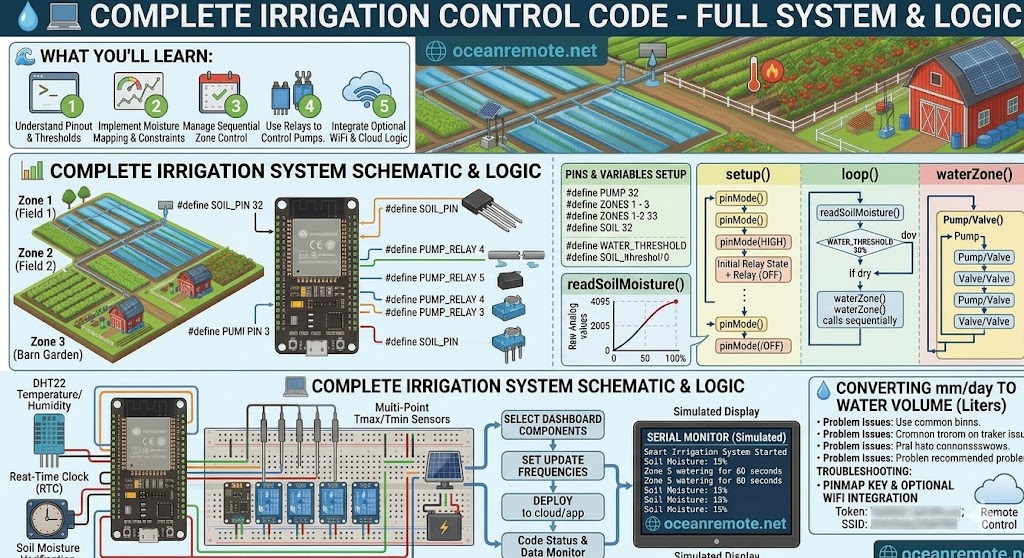
💻 What You'll Learn:
- ⚙️ Write complete irrigation code for multi-zone systems (up to 4 zones)
- 💧 Integrate soil moisture sensor to water only when needed
- 🔌 Control relays for pump and zone valves with sequential watering
- 📡 Optional WiFi integration for remote monitoring and cloud control
This complete irrigation control code runs on ESP32 and automates watering across multiple zones based on real-time soil moisture readings. The system waters zones sequentially, preventing pressure drops and ensuring even distribution.
🔧 Hardware Setup for Multi-Zone Irrigation
- ESP32 board ($6-8): Main controller
- Capacitive soil moisture sensor ($8-12): Measures water content
- 4-channel relay module ($6-10): Controls pump and up to 3 zone valves
- Water pump (12V or 220V): Provides water pressure
- Solenoid valves (12V DC or 24V AC, $10-20 each): Opens/closes each zone
- Power supply: 12V/5A for pump + 5V/2A for ESP32
🔌 Relay Pin Mapping:
PUMP_RELAY (GPIO4) → Controls main water pump
ZONE1_RELAY (GPIO5) → Zone 1 valve (Tomatoes)
ZONE2_RELAY (GPIO18) → Zone 2 valve (Peppers)
ZONE3_RELAY (GPIO19) → Zone 3 valve (Corn)
💡 How Sequential Watering Works:
- 1️⃣ Turn ON main pump → Water flows to pipes
- 2️⃣ Open Zone 1 valve → Water flows to Zone 1 for X seconds
- 3️⃣ Close Zone 1 valve, wait 2 seconds (pressure release)
- 4️⃣ Open Zone 2 valve → Water flows to Zone 2 for X seconds
- 5️⃣ Repeat for all zones, then turn OFF pump
📖 Complete Multi-Zone Irrigation Code
/*
 * Complete Multi-Zone Irrigation Control System
 * Water zones sequentially based on soil moisture
 *
 * Hardware:
 * - ESP32
 * - 1x Capacitive soil moisture sensor
 * - 1x 4-channel relay module
 * - 1x Water pump
 * - 3x Solenoid valves (one per zone)
 */

#include <WiFi.h>
#include <HTTPClient.h>

// ========== PIN DEFINITIONS ==========
#define SOIL_PIN 32           // Soil moisture sensor (capacitive)
#define PUMP_RELAY 4          // Main water pump (active LOW)
#define ZONE1_RELAY 5         // Zone 1 valve (Tomatoes)
#define ZONE2_RELAY 18        // Zone 2 valve (Peppers)
#define ZONE3_RELAY 19        // Zone 3 valve (Corn/Cabbage)
#define ZONE4_RELAY 21        // Zone 4 valve (Nursery) - optional

// ========== SOIL CALIBRATION ==========
const int DRY_VALUE = 3800;   // Replace with YOUR dry reading
const int WET_VALUE = 1500;   // Replace with YOUR wet reading

// ========== IRRIGATION PARAMETERS ==========
const int WATER_THRESHOLD = 30;   // Water when moisture below 30%
const int WATER_DURATION = 300;   // 5 minutes per zone (300 seconds)
const int ZONE_COUNT = 3;         // Number of active zones (1-4)

// ========== ZONE CONFIGURATION ==========
struct Zone {
    int relayPin;
    const char* name;
    int duration;  // seconds (can be customized per zone)
};

Zone zones[] = {
    {ZONE1_RELAY, "Tomatoes", 300},
    {ZONE2_RELAY, "Peppers", 300},
    {ZONE3_RELAY, "Corn", 300}
    // {ZONE4_RELAY, "Nursery", 180}  // Uncomment for 4th zone
};

// ========== WIFI CONFIGURATION (Optional) ==========
const char* ssid = "YOUR_WIFI";
const char* password = "YOUR_PASSWORD";
const char* token = "YOUR_OCEANREMOTE_TOKEN";

// ========== READ SOIL MOISTURE ==========
int readSoilMoisture() {
    int raw = analogRead(SOIL_PIN);
    int moisture = map(raw, DRY_VALUE, WET_VALUE, 0, 100);
    moisture = constrain(moisture, 0, 100);

    Serial.printf("   Raw ADC: %d | Moisture: %d%%\n", raw, moisture);
    return moisture;
}

// ========== WATER A SINGLE ZONE ==========
void waterZone(Zone &zone) {
    Serial.printf("\n💧 Zone: %s\n", zone.name);
    Serial.printf("   Opening valve for %d seconds...\n", zone.duration);

    // Open zone valve (active LOW)
    digitalWrite(zone.relayPin, LOW);
    delay(zone.duration * 1000);

    // Close zone valve
    digitalWrite(zone.relayPin, HIGH);
    Serial.println("   ✅ Zone complete");
}

// ========== WATER ALL ZONES SEQUENTIALLY ==========
void waterAllZones() {
    Serial.println("\n═══════════════════════════════════════════");
    Serial.println("💧 STARTING SEQUENTIAL IRRIGATION");
    Serial.println("═══════════════════════════════════════════");

    // Turn ON main pump
    digitalWrite(PUMP_RELAY, LOW);
    Serial.println("🟢 Main pump ON");
    delay(2000);  // Allow pressure to build

    // Water each zone in sequence
    for (int i = 0; i < ZONE_COUNT; i++) {
        waterZone(zones[i]);

        // Pause between zones to allow pressure release
        if (i < ZONE_COUNT - 1) {
            Serial.println("   ⏸️  Waiting 2 seconds before next zone...");
            delay(2000);
        }
    }

    // Turn OFF main pump
    digitalWrite(PUMP_RELAY, HIGH);
    Serial.println("🔴 Main pump OFF");

    Serial.println("═══════════════════════════════════════════");
    Serial.println("✅ IRRIGATION COMPLETE");
    Serial.println("═══════════════════════════════════════════\n");
}

// ========== WATER SINGLE ZONE MANUALLY ==========
void waterSingleZone(int zoneNumber, int seconds) {
    if (zoneNumber < 1 || zoneNumber > ZONE_COUNT) {
        Serial.println("❌ Invalid zone number");
        return;
    }

    int index = zoneNumber - 1;
    Serial.printf("\n💧 Manual watering: Zone %d (%s) for %d seconds\n",
                  zoneNumber, zones[index].name, seconds);

    digitalWrite(PUMP_RELAY, LOW);
    delay(1000);
    digitalWrite(zones[index].relayPin, LOW);
    delay(seconds * 1000);
    digitalWrite(zones[index].relayPin, HIGH);
    digitalWrite(PUMP_RELAY, HIGH);

    Serial.println("✅ Manual watering complete");
}

// ========== SEND DATA TO CLOUD (Optional) ==========
void sendToCloud(int moisture, bool watered, int duration) {
    if (WiFi.status() != WL_CONNECTED) return;

    HTTPClient http;
    http.begin("https://api.oceanremote.net/device/state");
    http.addHeader("Content-Type", "application/x-www-form-urlencoded");

    String data = "token=" + String(token);
    data += "&soil_moisture=" + String(moisture);
    data += "&irrigation=" + String(watered ? "ON" : "OFF");
    data += "&duration=" + String(duration);

    int httpCode = http.POST(data);
    if (httpCode == 200) {
        Serial.println("✅ Data sent to OceanRemote");
    }
    http.end();
}

// ========== DISPLAY SYSTEM STATUS ==========
void displayStatus() {
    Serial.println("\n╔═══════════════════════════════════════════╗");
    Serial.println("║      🌾 IRRIGATION SYSTEM STATUS        ║");
    Serial.println("╚═══════════════════════════════════════════╝");

    Serial.printf("\n💧 Water threshold: %d%%\n", WATER_THRESHOLD);
    Serial.printf("⏱️  Zone duration: %d seconds (%d minutes)\n",
                  WATER_DURATION, WATER_DURATION / 60);
    Serial.printf("🔢 Active zones: %d\n\n", ZONE_COUNT);

    for (int i = 0; i < ZONE_COUNT; i++) {
        Serial.printf("   Zone %d: %s\n", i+1, zones[i].name);
    }
    Serial.println("");
}

// ========== CONNECT TO WIFI (Optional) ==========
void connectToWiFi() {
    Serial.print("📡 Connecting to WiFi");
    WiFi.begin(ssid, password);
    int attempts = 0;
    while (WiFi.status() != WL_CONNECTED && attempts < 20) {
        delay(500);
        Serial.print(".");
        attempts++;
    }
    if (WiFi.status() == WL_CONNECTED) {
        Serial.println("\n✅ WiFi connected!");
        Serial.printf("📡 IP: %s\n", WiFi.localIP().toString().c_str());
    } else {
        Serial.println("\n⚠️ WiFi connection failed - running offline");
    }
}

// ========== SETUP ==========
void setup() {
    Serial.begin(115200);
    delay(1000);

    // Configure relay pins
    pinMode(PUMP_RELAY, OUTPUT);
    for (int i = 0; i < ZONE_COUNT; i++) {
        pinMode(zones[i].relayPin, OUTPUT);
    }

    // Start with all relays OFF (active HIGH means OFF)
    digitalWrite(PUMP_RELAY, HIGH);
    for (int i = 0; i < ZONE_COUNT; i++) {
        digitalWrite(zones[i].relayPin, HIGH);
    }

    // Optional: Connect to WiFi
    // connectToWiFi();

    Serial.println("═══════════════════════════════════════════");
    Serial.println("💧 COMPLETE IRRIGATION CONTROL SYSTEM v2.0");
    Serial.println("   Multi-Zone Automated Watering");
    Serial.println("═══════════════════════════════════════════\n");

    displayStatus();
    Serial.println("🟢 System ready!\n");
}

// ========== MAIN LOOP ==========
void loop() {
    int moisture = readSoilMoisture();

    Serial.println("━━━━━━━━━━━━━━━━━━━━━━━━━━━━━━━━━━━━━━━━");
    Serial.printf("💧 Current soil moisture: %d%%\n", moisture);

    if (moisture < WATER_THRESHOLD) {
        Serial.println("⚠️ Soil below threshold - starting irrigation\n");

        waterAllZones();

        // Send notification to cloud
        // sendToCloud(moisture, true, WATER_DURATION);

        // Wait after watering before checking again
        delay(3600000);  // 1 hour

    } else {
        Serial.println("✅ Soil moisture adequate - no watering needed\n");

        // Send status to cloud
        // sendToCloud(moisture, false, 0);

        delay(600000);  // Check every 10 minutes
    }
}
💡 Code Customization Options:
- Adjust WATER_THRESHOLD: Change 30 to 35 for more sensitive watering, 25 for drought-tolerant crops
- Adjust WATER_DURATION: Change 300 to 600 for larger zones, 120 for smaller zones
- Per-zone durations: Modify the zones array to give different times per zone
- Different crops: Add more zones and customize thresholds per zone with additional sensors
⚠️ Safety Notes for Irrigation Systems:
- 🔌 Never connect pumps directly to ESP32 - always use a relay module
- ⚠️ Add a master valve (PUMP_RELAY) so all zones share one pump - safer and cheaper
- 💧 Include delay between zones (2 seconds) to prevent water hammer pressure spikes
- 🔋 Use external power supply for relays (ESP32 5V pin cannot power 4+ relays)
- 💧 Add a flow meter to detect leaks (advanced feature)
📖 Case Study - 3-Zone Vegetable Farm:
A vegetable farm implemented this 3-zone irrigation system:
- 🍅 Zone 1 (Tomatoes): 300 seconds, waters at 30% threshold
- 🌶️ Zone 2 (Peppers): 300 seconds, waters at 35% threshold
- 🌽 Zone 3 (Corn): 300 seconds, waters at 25% threshold
Results: 40% water saved, 3 hours/week saved on manual watering, consistent crop health.
🎯 Key Takeaways:
- ✅ Sequential watering prevents pressure drop across zones
- ✅ Always turn on pump BEFORE opening zone valves
- ✅ Add 2-second pause between zones for pressure release
- ✅ Soil moisture threshold controls WHEN to water
- ✅ Duration controls HOW LONG to water each zone
- ✅ Optional WiFi integration for remote monitoring
💡 Key Takeaways:
- Apply these concepts directly to your farm or project.
- Take notes on important details for the quiz.
- Use the button below to track your progress.
×
![Enlarged view]()