← Back to Course
Uploading Data to OceanRemote Cloud
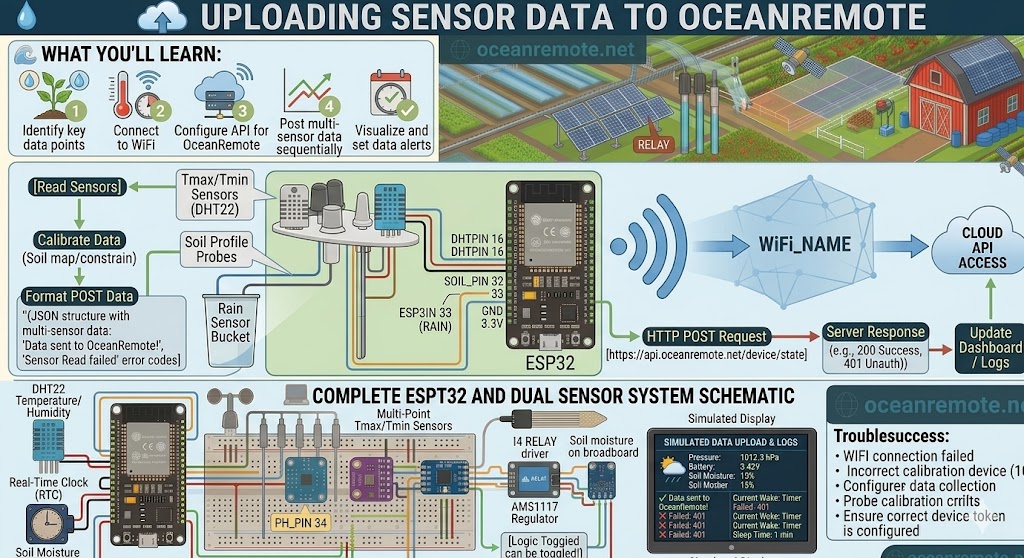
☁️ Uploading Sensor Data to OceanRemote - Send Your Farm Data to the Cloud
☁️ What You'll Learn:
- 📡 Send sensor data to OceanRemote cloud from ESP32
- 🌡️ Upload temperature, humidity, soil moisture, and rain data
- 📊 View real-time graphs and historical data anywhere
- 🚨 Set up alerts for critical thresholds
📖 Complete Cloud Upload Code
#include <WiFi.h>
#include <HTTPClient.h>
#include <DHT.h>

// WiFi credentials
const char* ssid = "YOUR_WIFI";
const char* password = "YOUR_PASSWORD";
const char* token = "YOUR_DEVICE_TOKEN";

// Sensor pins
#define SOIL_PIN 32
#define DHTPIN 16
#define DHTTYPE DHT22
#define RAIN_PIN 33

// Calibration
const int DRY = 3800, WET = 1500;

DHT dht(DHTPIN, DHTTYPE);

void setup() {
    Serial.begin(115200);
    dht.begin();
    pinMode(RAIN_PIN, INPUT_PULLUP);

    WiFi.begin(ssid, password);
    while (WiFi.status() != WL_CONNECTED) delay(500);
    Serial.println("✅ WiFi connected!");
}

void loop() {
    // Read sensors
    float temp = dht.readTemperature();
    float hum = dht.readHumidity();

    int raw = analogRead(SOIL_PIN);
    int soil = map(raw, DRY, WET, 0, 100);
    soil = constrain(soil, 0, 100);

    int rain = (digitalRead(RAIN_PIN) == LOW) ? 1 : 0;

    // Send to cloud
    sendData(temp, hum, soil, rain);

    delay(60000);  // Send every minute
}

void sendData(float temp, float hum, int soil, int rain) {
    if (WiFi.status() != WL_CONNECTED) return;

    HTTPClient http;
    http.begin("https://api.oceanremote.net/device/state");
    http.addHeader("Content-Type", "application/x-www-form-urlencoded");

    String data = "token=" + String(token);
    data += "&temperature=" + String(temp);
    data += "&humidity=" + String(hum);
    data += "&soil_moisture=" + String(soil);
    data += "&raining=" + String(rain ? "YES" : "NO");

    int code = http.POST(data);

    if (code == 200) {
        Serial.println("✅ Data sent to OceanRemote");
        Serial.printf("   Temp: %.1f°C | Humidity: %.0f%% | Soil: %d%%\n", temp, hum, soil);
    } else {
        Serial.printf("❌ Upload failed: HTTP %d\n", code);
    }

    http.end();
}
💡 Getting Your Device Token:
- Log in to OceanRemote dashboard
- Go to Devices → Add Device
- Copy your unique token
- Paste into code (
const char* token)
✅ Once Uploading:
- 📊 View real-time graphs on your dashboard
- 📅 See historical data (days, weeks, months)
- 🚨 Set alerts for low moisture, high temp
- 📱 Access from anywhere on phone or computer
💡 Key Takeaways:
- Apply these concepts directly to your farm or project.
- Take notes on important details for the quiz.
- Use the button below to track your progress.
×
![Enlarged view]()