← Back to Course
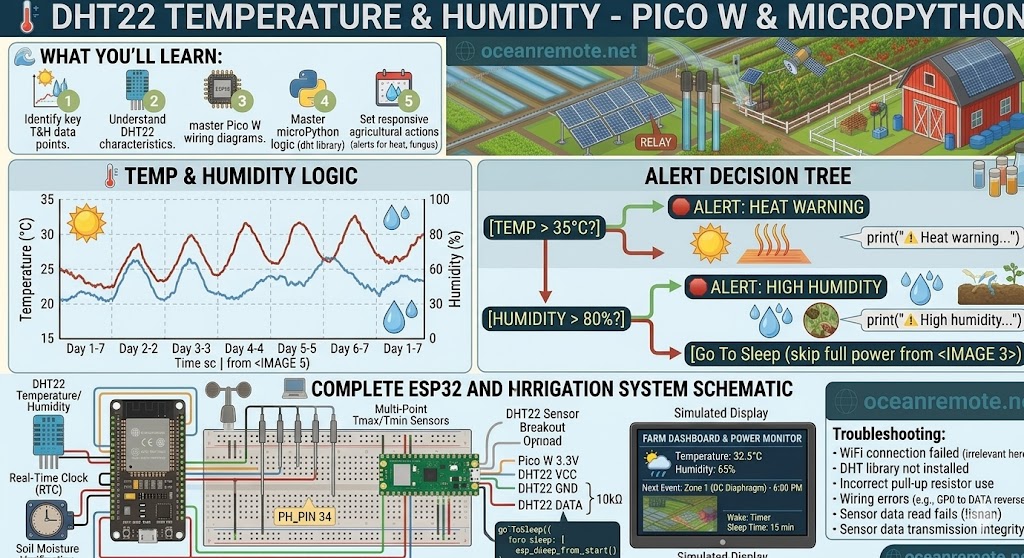
DHT22 Temperature and Humidity Sensor picow
🌡️ DHT22 Temperature and Humidity Sensor for Raspberry Pi Pico W
🌡️ What You'll Learn:
- 🔌 Wire DHT22 to Pico W (3 wires + pull-up resistor)
- 📦 Install micropython-dht library in Thonny
- 💻 Read temperature and humidity in MicroPython
- ⚠️ Get alerts for heat waves and high humidity
🔌 Wiring Diagram
DHT22 Sensor              Raspberry Pi Pico W
══════════════            ════════════════════
VCC (Pin 1)     ─────►    3.3V (Pin 36)
GND (Pin 4)     ─────►    GND (Pin 38)
DATA (Pin 2)    ─────►    GP0 (Pin 1)

⚠️ IMPORTANT: Add 10kΩ pull-up resistor between DATA and 3.3V!

    3.3V ──┬── 10kΩ ──┬── DHT22 DATA
           │          │
           └──────────┴── Pico GP0

    DHT22 pins (front view, pins facing you):
    ┌─────────────┐
    │ (1) VCC     │
    │ (2) DATA    │
    │ (3) NC      │
    │ (4) GND     │
    └─────────────┘
📦 Install DHT Library in Thonny
- Open Thonny IDE
- Click Tools → Manage Packages
- Search for "micropython-dht"
- Click Install
📖 Complete MicroPython Code
import dht
from machine import Pin
import time

# Initialize DHT22 on GP0
sensor = dht.DHT22(Pin(0))

print("🌡️ DHT22 Weather Monitor Started")
print("=================================")

while True:
    try:
        # Measure sensor (takes 0.5-1 second)
        sensor.measure()

        # Read values
        temp = sensor.temperature()
        hum = sensor.humidity()

        # Display results
        print(f"\n🌡️ Temperature: {temp}°C | {temp * 9/5 + 32:.1f}°F")
        print(f"💧 Humidity: {hum}%")

        # Alerts
        if temp > 35:
            print("⚠️ HEAT WARNING! Increase ventilation/irrigation")
        elif temp < 10:
            print("⚠️ COLD! Protect sensitive crops from frost")

        if hum > 85:
            print("⚠️ HIGH HUMIDITY! Risk of fungal disease")
        elif hum < 30:
            print("⚠️ LOW HUMIDITY! Plants under stress")

    except Exception as e:
        print("❌ Sensor error:", e)
        print("   Check wiring and pull-up resistor")

    time.sleep(10)  # Read every 10 seconds
💡 Troubleshooting:
- "Sensor error" or no readings: Check pull-up resistor (10kΩ between DATA and 3.3V)
- Wrong values: DHT22 needs 2 seconds between readings (delay at least 2 seconds)
- No library found: Install micropython-dht via Tools → Manage Packages
- Temperature stuck at -40°C: Bad connection on DATA pin
🎯 Quick Reference:
- 🔌 Pins: VCC→3.3V, GND→GND, DATA→GP0
- 🔧 10kΩ pull-up resistor REQUIRED between DATA and 3.3V
- 📦 Library: micropython-dht
- ⚠️ Temp >35°C = heat stress, Humidity >85% = fungus risk
💡 Key Takeaways:
- Apply these concepts directly to your farm or project.
- Take notes on important details for the quiz.
- Use the button below to track your progress.
×
![Enlarged view]()