← Back to Course
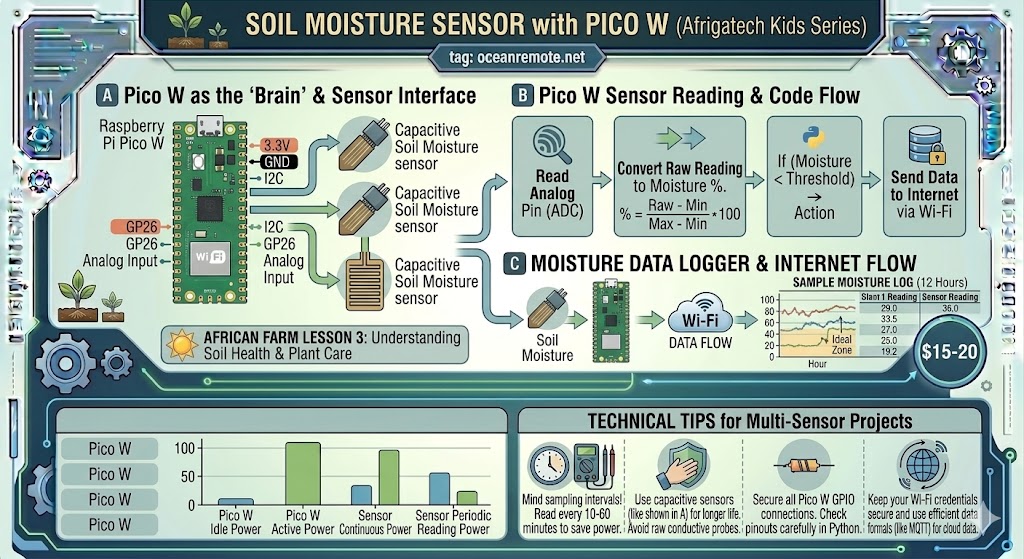
Soil Moisture Sensor with Pico W
💧 Soil Moisture Sensor Complete Guide for Raspberry Pi Pico W
💧 What You'll Learn:
- 🔌 Wire soil moisture sensor to Pico W correctly
- 📊 Calibrate sensor for accurate moisture readings
- 💧 Make irrigation decisions based on soil conditions
- 🐍 Write complete MicroPython code for sensor reading
Soil moisture sensors help you water only when needed, saving 30-40% of water while improving crop yields. The Pico W's built-in ADC makes it perfect for analog sensors.
🔌 Wiring Diagram
═══════════════════════════════════════════════════════════════════════════════
                    SOIL MOISTURE SENSOR TO PICO W
═══════════════════════════════════════════════════════════════════════════════

    Capacitive Sensor                    Raspberry Pi Pico W
    ┌─────────────────┐                  ┌─────────────────┐
    │ VCC (3.3-5V)    │ ───────────────► │ 3.3V (Pin 36)   │
    │ GND             │ ───────────────► │ GND (Pin 38)    │
    │ AO (Analog Out) │ ───────────────► │ GP26 (Pin 31)   │
    └─────────────────┘                  └─────────────────┘

    ⚠️ Note: Pico W ADC pins are GP26, GP27, GP28 only!
    GP26 = ADC0, GP27 = ADC1, GP28 = ADC2

═══════════════════════════════════════════════════════════════════════════════
📖 Complete MicroPython Code
from machine import Pin, ADC
import time

# ADC on GP26 reads 0-3.3V -> 0-65535
moisture = ADC(Pin(26))

# ========== CALIBRATION VALUES ==========
# CALIBRATE THESE FOR YOUR SPECIFIC SENSOR!
DRY_VALUE = 60000    # Value in dry air (calibrate this!)
WET_VALUE = 20000    # Value in water (calibrate this!)

def read_moisture():
    """Read soil moisture and return percentage 0-100%"""
    raw = moisture.read_u16()

    # Convert raw value to percentage
    # Higher raw = drier, lower raw = wetter
    percent = 100 - ((raw - WET_VALUE) * 100 / (DRY_VALUE - WET_VALUE))
    percent = max(0, min(100, percent))  # Clamp between 0-100

    return raw, percent

def get_recommendation(percent):
    """Get irrigation recommendation based on moisture level"""
    if percent < 20:
        return "🚨 CRITICAL: Soil extremely dry! Water immediately!"
    elif percent < 30:
        return "⚠️ SOIL IS DRY - Water within 24 hours"
    elif percent < 45:
        return "💡 Soil slightly dry - Monitor closely"
    elif percent <= 70:
        return "✅ OPTIMAL - Soil moisture adequate"
    elif percent <= 85:
        return "💧 Soil moist - Reduce irrigation"
    else:
        return "⚠️ Soil too wet - Risk of root rot!"

print("Soil Moisture Monitor Started")
print(f"Calibration: Dry={DRY_VALUE}, Wet={WET_VALUE}\n")

while True:
    raw, percent = read_moisture()

    print("━━━━━━━━━━━━━━━━━━━━━━━━━━━━━━━━━━")
    print(f"📊 Raw ADC: {raw}")
    print(f"💧 Soil Moisture: {percent:.1f}%")
    print(f"🎯 {get_recommendation(percent)}")
    print("━━━━━━━━━━━━━━━━━━━━━━━━━━━━━━━━━━\n")

    time.sleep(60)  # Read every minute
💡 Calibration Tips:
- DRY_VALUE: Place sensor in dry air for 2 minutes, record the reading
- WET_VALUE: Submerge sensor completely in water for 2 minutes, record the reading
- Every sensor is different - Always calibrate YOUR sensor!
- Capacitive sensors last longer than resistive ones
- Re-calibrate if you see unusual readings after months of use
⚠️ Common Issues:
- Reading always 0% or 100%: Wrong calibration values - re-calibrate
- Reading decreases over time: You're using a resistive sensor (replace with capacitive)
- Wild fluctuations: Add moving average filter (average 3-5 readings)
- Values stuck: Check wiring - loose connection or wrong pin
🎉 Key Takeaways:
- ✅ Pico W ADC pins: GP26, GP27, GP28 (0-65535 range)
- ✅ Always calibrate: dry air + water test
- ✅ Capacitive sensors last YEARS (resistive fails in months)
- ✅ Read every 15-60 minutes - not constantly
- ✅ Install at root depth (10-20cm) for accurate readings
💡 Key Takeaways:
- Apply these concepts directly to your farm or project.
- Take notes on important details for the quiz.
- Use the button below to track your progress.
×
![Enlarged view]()