← Back to Course
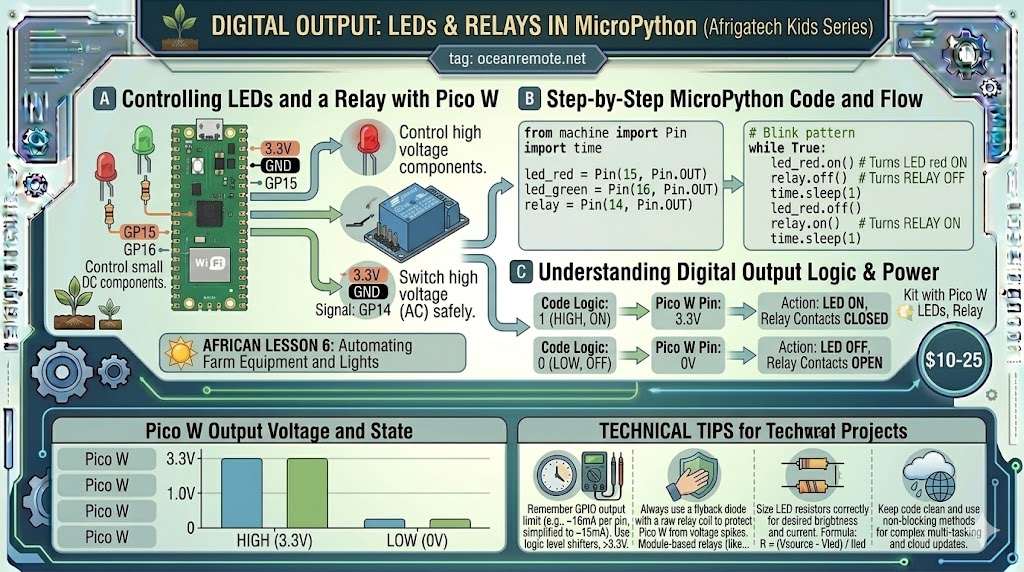
Digital Output: LEDs and Relays in MicroPython
💡 Digital Output with MicroPython - LED & Relay Control
💡 What You'll Learn:
- 🔌 Control LEDs, relays, and pumps with MicroPython
- 💧 Automate water pumps based on soil moisture
- ⚡ Understand active LOW vs active HIGH relays
🔧 Basic LED Control
from machine import Pin
import time

# LED on GP0 with 220Ω resistor
led = Pin(0, Pin.OUT)

while True:
    led.on()      # LED ON
    print("🔴 LED ON")
    time.sleep(1)

    led.off()     # LED OFF
    print("⚫ LED OFF")
    time.sleep(1)
💧 Relay Control for Water Pump
from machine import Pin
import utime

# Relay on GP1 (most 5V relays are ACTIVE LOW)
relay = Pin(1, Pin.OUT)
relay.value(1)     # Start with pump OFF (HIGH = OFF for active LOW)

def water_pump(seconds):
    print(f"💧 Watering for {seconds} seconds...")
    relay.value(0)      # LOW = pump ON
    utime.sleep(seconds)
    relay.value(1)      # HIGH = pump OFF
    print("✅ Watering complete")

# Example: water if soil is dry
soil_moisture = 25  # Replace with sensor reading
if soil_moisture < 30:
    water_pump(10)      # Water for 10 seconds
💡 MicroPython vs Arduino:
- MicroPython:
led.on()/led.off()orled.value(1/0) - Arduino:
digitalWrite(pin, HIGH/LOW) - Most 5V relays are ACTIVE LOW:
value(0)= ON,value(1)= OFF
⚠️ Important:
- Always use a resistor (220Ω) with LEDs to prevent damage
- Never connect a pump directly to Pico - use a relay!
- Test your relay: if ON when value(0), it's active LOW
🎉 Quick Reference:
Pin(pin, Pin.OUT)→ Set as output.on() / .off()→ Turn on/off.value(1) / .value(0)→ Set HIGH/LOWutime.sleep(seconds)→ Delay (non-blocking sleep)
💡 Key Takeaways:
- Apply these concepts directly to your farm or project.
- Take notes on important details for the quiz.
- Use the button below to track your progress.
×
![Enlarged view]()