← Back to Course
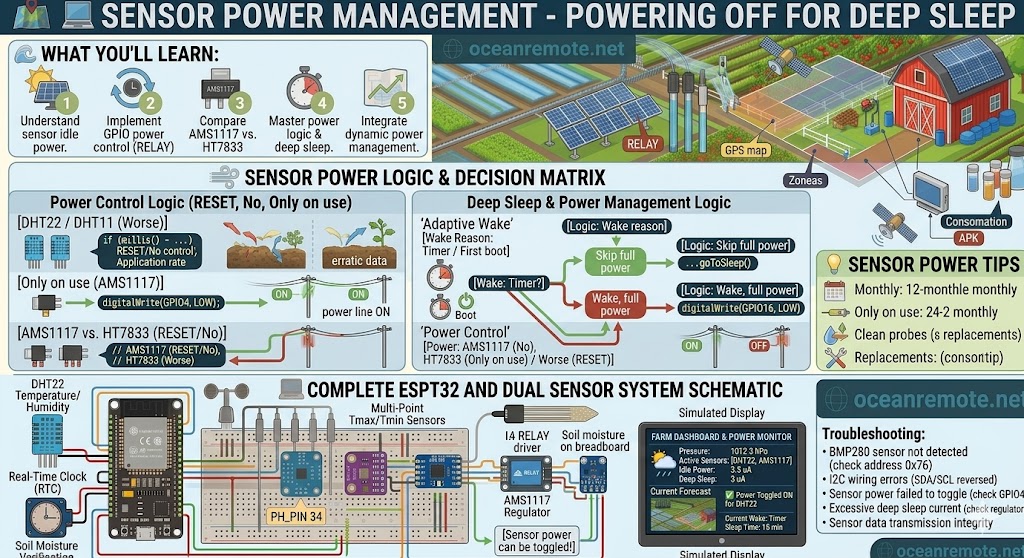
Sensor Power Management
🔌 Sensor Power Management - Turn Off Sensors When Not Reading
🔌 What You'll Learn:
- 🔋 Many sensors waste power while idle (even in deep sleep)
- ⚡ Use a MOSFET or transistor to cut power to sensors
- 📊 Reduce total power consumption by 80-95%
- 🔌 Wire sensors to GPIO pin for on/off control
📊 Sensor Power Consumption
| Sensor | Active | Idle | Worse Case |
|---|---|---|---|
| DHT22 | 1.5mA | 0.1mA | ⚠️ OK |
| Soil Moisture (Capacitive) | 5mA | 0mA | ✅ Good |
| BME280 | 0.1mA | 0.1μA | ✅ Excellent |
| NPK Sensor (RS485) | 30mA | 30mA | ⚠️ ALWAYS ON! |
| Rain Sensor (LED type) | 15mA | 15mA | ⚠️ ALWAYS ON! |
💡 The Problem:
Some sensors (NPK, rain sensors with LED) consume power constantly, even in deep sleep. A 30mA sensor running 24/7 drains a 2600mAh battery in 3.5 days! Solution: Cut power completely.
🔌 MOSFET Power Switching Wiring
═══════════════════════════════════════════════════════════════════════════════
                    POWER SENSOR WITH GPIO PIN
═══════════════════════════════════════════════════════════════════════════════

    GPIO (ESP32) ────► 1kΩ resistor ────► MOSFET Gate (IRLZ44N)
    3.3V power supply ──────────────────► MOSFET Source
    Sensor VCC ──────────────────────────► MOSFET Drain
    Sensor GND ──────────────────────────► GND (shared)

    MOSFET options: IRLZ44N, AO3400, 2N7000 (logic-level, 3.3V compatible)

    ESP32 GPIO = HIGH (3.3V) → MOSFET ON → Sensor powered
    ESP32 GPIO = LOW (0V)    → MOSFET OFF → Sensor completely OFF

═══════════════════════════════════════════════════════════════════════════════
                    SIMPLER: POWER SENSOR DIRECTLY FROM GPIO
═══════════════════════════════════════════════════════════════════════════════

    ⚠️ Only for low-power sensors (< 20mA)

    ESP32 GPIO ──────────────────────────► Sensor VCC
    ESP32 GND ───────────────────────────► Sensor GND

    pinMode(GPIO, OUTPUT);
    digitalWrite(GPIO, HIGH);  // Power ON sensor
    delay(100);                // Wait for sensor to stabilize
    read sensor...
    digitalWrite(GPIO, LOW);   // Power OFF sensor
📖 Complete Power Management Code
#define NPK_POWER 25     // MOSFET control pin
#define NPK_RX 16
#define NPK_TX 17

void setup() {
    pinMode(NPK_POWER, OUTPUT);
    digitalWrite(NPK_POWER, LOW);  // Start with sensor OFF
}

void readNPK() {
    // Step 1: Power ON sensor
    digitalWrite(NPK_POWER, HIGH);
    delay(200);  // Wait for sensor to boot (critical!)

    // Step 2: Read sensor
    int n, p, k;
    readNPKValues(n, p, k);  // Your reading code here

    // Step 3: Power OFF sensor
    digitalWrite(NPK_POWER, LOW);

    Serial.printf("NPK: %d, %d, %d\n", n, p, k);
}

// Power-saving version for DHT22 (using GPIO power)
#define DHT_POWER 26
DHT dht(27, DHT22);  // Data pin on 27

void readDHT() {
    digitalWrite(DHT_POWER, HIGH);
    delay(2000);  // DHT22 needs 2 seconds to stabilize

    float t = dht.readTemperature();
    float h = dht.readHumidity();

    digitalWrite(DHT_POWER, LOW);
    Serial.printf("T: %.1f, H: %.1f%%\n", t, h);
}

void loop() {
    readNPK();   // Sensor only powered for 0.5 seconds
    delay(60000);
}
⚠️ Important Notes:
- Some sensors need 1-2 seconds to warm up before reading
- ESP32 GPIO can supply max 40mA (use MOSFET for higher current)
- Capacitive sensors (<10mA) can be powered directly from GPIO
- NPK sensors (30mA+) MUST use external MOSFET or relay
📖 Case Study - Rain Sensor Power Fix:
A rain sensor with LED consumed 15mA continuously (3.6mAh/day). Battery lasted only 2 weeks.
- ✅ Fix: Connected sensor VCC to ESP32 GPIO via MOSFET
- ⏰ Power ON only for 100ms each reading (once per hour)
- 🔋 Result: Battery life increased from 2 weeks to 6+ months
🎯 Key Takeaways:
- ❌ NPK sensors, LED rain sensors waste power 24/7
- ✅ Use MOSFET or GPIO to power sensors only when reading
- ⚡ Low-power sensors (<20mA) can connect directly to GPIO
- ⏰ Always add delay after powering ON (sensor warm-up)
- 🔋 Power management = 10-50x longer battery life
💡 Key Takeaways:
- Apply these concepts directly to your farm or project.
- Take notes on important details for the quiz.
- Use the button below to track your progress.
×
![Enlarged view]()