← Back to Course
WiFi Power Optimization
📶 WiFi Power Optimization - Minimizing Connection Time
📡 What You'll Learn in This Lesson:
- ⚡ Reduce WiFi power consumption from 170mA to near zero
- 🔌 Connect, send data, and disconnect in under 3 seconds
- 📊 Extend battery life from 2 days to 3+ months
- 🛠️ Use static IP and modem sleep for faster connections
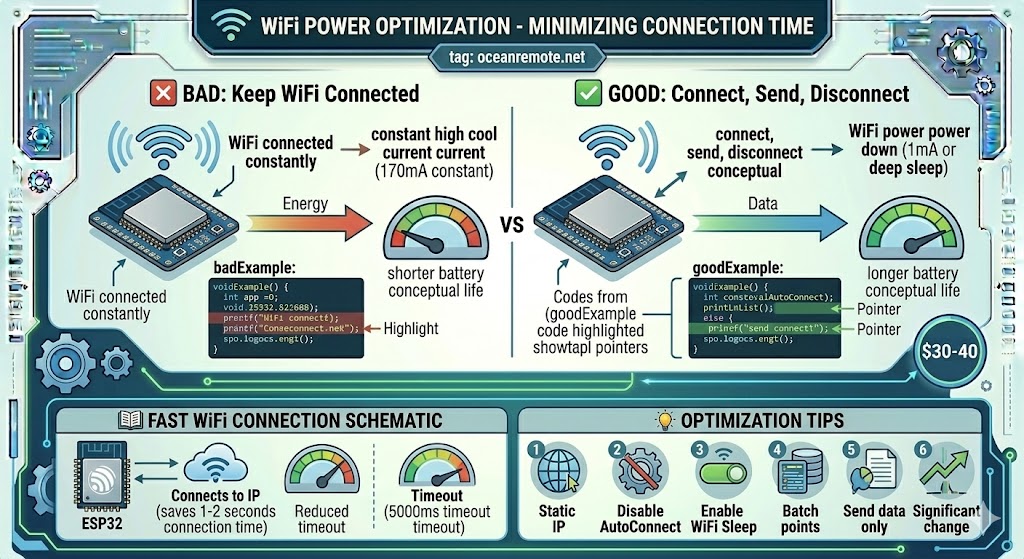
WiFi consumes 100-170mA while connected - this is the #1 battery killer in IoT sensors! A standard 2600mAh battery would last only 1-2 days with constant WiFi. But with proper optimization, the same battery can last 2-3 months!
📊 Bad vs Good Practice
// ❌ BAD: Keep WiFi connected constantly (170mA always)
void badExample() {
    WiFi.begin(ssid, password);
    while (WiFi.status() != WL_CONNECTED) delay(100);
    sendData();
    // WiFi stays ON after sending - battery dies in 1-2 days!
}

// ✅ GOOD: Connect only when needed, disconnect immediately
void goodExample() {
    WiFi.begin(ssid, password);
    int attempts = 0;
    while (WiFi.status() != WL_CONNECTED && attempts < 20) {
        delay(200);
        attempts++;
    }
    if (WiFi.status() == WL_CONNECTED) {
        sendData();                    // Send batch of data
        WiFi.disconnect(true);         // Power down WiFi radio
        WiFi.mode(WIFI_OFF);           // Turn off completely
    }
}
📖 Complete Optimized WiFi Code
#include <WiFi.h>
#include <HTTPClient.h>

const char* ssid = "YOUR_WIFI";
const char* password = "YOUR_PASSWORD";
const char* token = "YOUR_OCEANREMOTE_TOKEN";

// Static IP for faster connection (saves 1-2 seconds!)
IPAddress staticIP(192,168,1,100);
IPAddress gateway(192,168,1,1);
IPAddress subnet(255,255,255,0);
IPAddress dns(8,8,8,8);

void connectFast() {
    // Configure WiFi for minimum connection time
    WiFi.mode(WIFI_STA);
    WiFi.setSleep(true);                    // Enable modem sleep
    WiFi.setAutoConnect(false);             // Don't scan for networks
    WiFi.config(staticIP, gateway, subnet, dns);  // Static IP = faster!

    WiFi.begin(ssid, password);

    // Timeout after 5 seconds max
    unsigned long start = millis();
    while (WiFi.status() != WL_CONNECTED &&
           millis() - start < 5000) {
        delay(50);
    }
}

void sendData() {
    if (WiFi.status() != WL_CONNECTED) return;

    HTTPClient http;
    http.begin("https://api.oceanremote.net/device/state");
    http.addHeader("Content-Type", "application/x-www-form-urlencoded");

    // Batch multiple readings in one request
    String data = "token=" + String(token);
    data += "&soil_moisture=" + String(readSoilMoisture());
    data += "&temperature=" + String(readTemp());
    data += "&battery=" + String(readBattery());

    http.POST(data);
    http.end();
}

void setup() {
    Serial.begin(115200);

    connectFast();           // Connect (1-3 seconds)

    if (WiFi.status() == WL_CONNECTED) {
        sendData();          // Send data (under 1 second)
        WiFi.disconnect(true);   // Disconnect WiFi
        WiFi.mode(WIFI_OFF);     // Turn off radio completely
    }

    // Go to deep sleep for 1 hour
    esp_sleep_enable_timer_wakeup(3600000000);
    esp_deep_sleep_start();
}

void loop() {
    // Empty - everything runs in setup()
}
📊 Power Savings Comparison
| Method | WiFi On Time | Daily Power Use | Battery Life (2600mAh) |
|---|---|---|---|
| ❌ Always Connected | 24 hours/day | ~4000mAh | 0.6 days (15 hours!) |
| ⚠️ Connect hourly, no optimization | ~30 seconds/hour | ~50mAh/day | 52 days |
| ✅ Connect hourly + optimized | ~3 seconds/hour | ~5mAh/day | 520 days! (1.4 years) |
💡 Key Optimization Techniques:
- Static IP: Saves 1-2 seconds of DHCP negotiation → use
WiFi.config() - Modem Sleep: Reduces power during connection →
WiFi.setSleep(true) - Disable Auto-Connect: Prevents scanning →
WiFi.setAutoConnect(false) - Batch Data: Send all readings in one HTTP request, not multiple
- Disconnect Completely:
WiFi.disconnect(true)+WiFi.mode(WIFI_OFF)
⚠️ Common Mistakes:
- Forgetting to disconnect: WiFi stays on → battery dies in 2 days
- Using DHCP: Adds 1-2 seconds of connection time each time
- Connecting too often: Every 5 minutes vs every hour = 12x more power
- Sending each sensor separately: Batch them into one request!
📖 Case Study - 10x Battery Life Improvement:
A weather station in rural Uganda was burning through batteries every 2 weeks:
- Problem: WiFi stayed connected 24/7, consuming 170mA constantly
- Fix: Changed to connect hourly, send data in 3 seconds, then disconnect
- Result: Battery life increased from 2 weeks to 8 months!
- Savings: $60/year in battery costs + less maintenance
"Now our weather stations run for an entire season on one battery charge." - Farm Tech, Uganda
🎉 Key Takeaways:
- ✅ Connect, send data, disconnect - never keep WiFi on!
- ✅ Use static IP to save connection time
- ✅ Batch multiple readings into one HTTP request
- ✅ Extend battery life from 2 days to 3+ months
Pro tip: 3 seconds of WiFi per hour uses 500x less power than leaving it on!
| Setting | Code | Time Saved |
|---|---|---|
| Static IP | WiFi.config(ip, gw, subnet) | 1-2 seconds |
| Modem Sleep | WiFi.setSleep(true) | Power saving |
| Disable Auto-Connect | WiFi.setAutoConnect(false) | 1 second |
| Disconnect Completely | WiFi.disconnect(true); WiFi.mode(WIFI_OFF) | Saves 170mA |
💡 Key Takeaways:
- Apply these concepts directly to your farm or project.
- Take notes on important details for the quiz.
- Use the button below to track your progress.
×
![Enlarged view]()