Complete Solar-Powered Soil Sensor
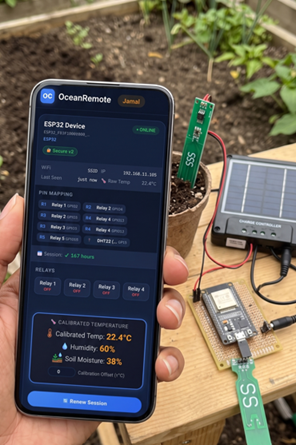
☀️ Complete Solar-Powered Soil Sensor Station
🌱 What You'll Learn in This Lesson:
- Build a completely off-grid, solar-powered soil sensor
- Monitor soil moisture AND battery voltage remotely
- Optimize power consumption for months of operation
- Track how many times your sensor has reported data
- Deploy in remote fields without power access
🌍 Why Solar-Powered IoT for African Farms?
Many farms in Africa lack reliable grid electricity. Solar-powered sensors solve this problem completely!
| Challenge | Solar Solution |
|---|---|
| 🔌 No grid electricity | Solar panel + battery = unlimited power |
| 💰 High battery replacement cost | Solar charges battery, lasts years |
| 📡 Remote location access | Deploy anywhere with GSM/WiFi coverage |
| 🔋 Battery health unknown | Monitor voltage remotely to prevent failure |
🛠️ Complete Components List
| Component | Cost | Purpose |
|---|---|---|
| ESP32 (ESP32-S2 or S3 for lower power) | $6-10 | Main controller |
| Capacitive Soil Moisture Sensor | $8-12 | Measures soil water content |
| 6V Solar Panel (2W minimum) | $10-15 | Generates power from sun |
| 18650 Li-ion Battery (2000-3000mAh) | $5-8 | Stores energy for night/cloudy days |
| TP4056 Battery Charging Module | $2-3 | Manages solar charging |
| Voltage Divider (2x 100kΩ resistors) | $0.20 | Measures battery voltage safely |
Total cost: ~$35-50 for a complete solar-powered sensor station!
AliExpress (2-4 weeks, cheapest), Jumia (faster, local), or local electronics shops in major cities.
🔌 Complete Wiring Diagram
Never connect solar panel directly to ESP32! Always use a battery and charging module (TP4056).
╔═══════════════════════════════════════════════════════════════════════════╗
║                         SOLAR-POWERED SENSOR STATION                       ║
╠═══════════════════════════════════════════════════════════════════════════╣
║                                                                           ║
║   ☀️ SOLAR PANEL (6V)                                                     ║
║         │                                                                 ║
║         ├─ Positive (+) ──────────► TP4056 IN+ (B+ on module)            ║
║         └─ Negative (-) ──────────► TP4056 IN- (B- on module)            ║
║                                                                           ║
║   🔋 TP4056 CHARGING MODULE                                               ║
║         │                                                                 ║
║         ├─ BAT+ (18650 positive) ──► 18650 Battery (+)                   ║
║         ├─ BAT- (18650 negative) ──► 18650 Battery (-)                   ║
║         │                                                                 ║
║         ├─ OUT+ (4.2V regulated) ──► ESP32 VIN pin                       ║
║         └─ OUT- (GND) ──────────────► ESP32 GND pin                      ║
║                                                                           ║
║   🧠 ESP32                                                                ║
║         │                                                                 ║
║         ├─ GPIO32 (ADC) ──────────► Soil Moisture Sensor AO              ║
║         ├─ 3.3V ──────────────────► Soil Moisture Sensor VCC             ║
║         │                                                                 ║
║         ├─ GPIO34 (ADC) ──────────► Voltage Divider Center (Battery)     ║
║         │                                                                 ║
║         └─ GND ───────────────────► All sensor grounds                   ║
║                                                                           ║
║   🔋 VOLTAGE DIVIDER (for battery monitoring)                            ║
║         4.2V (Battery+)                                                  ║
║           │                                                              ║
║           ├─ 100kΩ ──────────────┬──► GPIO34 (ADC)                       ║
║           │                      │                                       ║
║           └─ 100kΩ ──────────────┴──► GND                                ║
║                                                                           ║
╚═══════════════════════════════════════════════════════════════════════════╝
📖 Complete Code with Line-by-Line Explanation
/* * ☀️ Complete Solar-Powered Soil Sensor Station * * Monitors soil moisture and battery voltage * Sleeps for 15 minutes between readings * Runs for months on a single charge (solar recharges!) * * Perfect for remote fields, greenhouses, and off-grid farms * * Author: OceanRemote Education * Version: 1.0 */ #include// For network connectivity #include // For sending data to cloud // ========== WIFI CONFIGURATION ========== const char* ssid = "YOUR_WIFI"; // Replace with your WiFi name const char* password = "YOUR_PASSWORD"; // Replace with your WiFi password // ========== OCEANREMOTE CONFIGURATION ========== const char* token = "YOUR_OCEANREMOTE_TOKEN"; // Get this from OceanRemote dashboard // ========== PIN DEFINITIONS ========== #define SOIL_PIN 32 // GPIO32 - Soil moisture sensor (ADC) #define BATTERY_PIN 34 // GPIO34 - Battery voltage monitoring (ADC) // ========== SOIL MOISTURE CALIBRATION ========== const int DRY_VALUE = 3800; // Reading when sensor is in dry air const int WET_VALUE = 1500; // Reading when sensor is completely submerged in water // ========== VOLTAGE DIVIDER SETUP ========== // Using 100kΩ + 100kΩ divider = 2x reduction // Actual battery voltage = ADC reading × 2 const float VOLTAGE_DIVIDER_RATIO = 2.0; // ========== RTC DATA (Survives deep sleep) ========== // This variable keeps its value even when ESP32 sleeps RTC_DATA_ATTR int bootCount = 0; void setup() { // ---------- STEP 1: INITIALIZE ---------- Serial.begin(115200); bootCount++; // Increment boot counter (tracks how many readings) Serial.println("========================================"); Serial.print("🌱 Solar Soil Sensor v1.0 - Boot #"); Serial.println(bootCount); Serial.println("========================================"); // ---------- STEP 2: READ SOIL MOISTURE ---------- int raw = analogRead(SOIL_PIN); Serial.print("📊 Raw soil reading: "); Serial.println(raw); // Convert raw ADC value (0-4095) to percentage (0-100%) int moisture = map(raw, DRY_VALUE, WET_VALUE, 0, 100); // Keep value within 0-100% range moisture = constrain(moisture, 0, 100); Serial.print("💧 Soil moisture: "); Serial.print(moisture); Serial.println("%"); // ---------- STEP 3: READ BATTERY VOLTAGE ---------- int batteryRaw = analogRead(BATTERY_PIN); Serial.print("🔋 Raw battery reading: "); Serial.println(batteryRaw); // Convert ADC reading to voltage (3.3V reference / 4095 steps) float voltage = batteryRaw * (3.3 / 4095.0); // Apply voltage divider factor (2.0x) to get actual battery voltage float batteryVoltage = voltage * VOLTAGE_DIVIDER_RATIO; Serial.print("🔋 Battery voltage: "); Serial.print(batteryVoltage); Serial.println("V"); // ---------- STEP 4: BATTERY HEALTH CHECK ---------- if (batteryVoltage < 3.3) { Serial.println("⚠️ BATTERY LOW! Voltage below 3.3V - Replace or recharge soon!"); } else if (batteryVoltage < 3.5) { Serial.println("🟡 Battery medium - Consider recharging soon"); } else if (batteryVoltage > 4.1) { Serial.println("✅ Battery fully charged!"); } else { Serial.println("✅ Battery healthy"); } // ---------- STEP 5: IRRIGATION RECOMMENDATION ---------- if (moisture < 30) { Serial.println("⚠️ SOIL DRY! Time to water your crops!"); } else if (moisture < 50) { Serial.println("🟡 Soil is drying - Monitor closely"); } else if (moisture > 80) { Serial.println("✅ Soil wet - No watering needed"); } else { Serial.println("✅ Soil moisture adequate"); } // ---------- STEP 6: CONNECT TO WIFI (with timeout) ---------- Serial.print("📡 Connecting to WiFi"); WiFi.begin(ssid, password); int attempts = 0; while (WiFi.status() != WL_CONNECTED && attempts < 20) { delay(200); Serial.print("."); attempts++; } if (WiFi.status() == WL_CONNECTED) { Serial.println("\n✅ WiFi connected!"); Serial.print("📶 IP address: "); Serial.println(WiFi.localIP()); // ---------- STEP 7: SEND DATA TO OCEANREMOTE ---------- HTTPClient http; http.begin("https://api.oceanremote.net/device/state"); http.addHeader("Content-Type", "application/x-www-form-urlencoded"); // Build the data string String data = "token=" + String(token); data += "&soil_moisture=" + String(moisture); data += "&battery_voltage=" + String(batteryVoltage); data += "&boot_count=" + String(bootCount); // Optional: Add irrigation recommendation if (moisture < 30) { data += "&status=needs_water"; } else { data += "&status=ok"; } Serial.println("📤 Sending data to OceanRemote..."); Serial.println(data); int httpCode = http.POST(data); if (httpCode > 0) { Serial.print("✅ Data sent! HTTP response: "); Serial.println(httpCode); } else { Serial.print("❌ Failed to send data. Error: "); Serial.println(httpCode); } http.end(); // Close connection // Disconnect WiFi to save power WiFi.disconnect(true); WiFi.mode(WIFI_OFF); Serial.println("📡 WiFi disconnected to save power"); } else { Serial.println("\n❌ WiFi connection failed! Skipping data send."); Serial.println(" (Will retry on next wake-up)"); } // ---------- STEP 8: CALCULATE NEXT WAKE-UP TIME ---------- // Get current time for logging unsigned long currentTime = millis() / 1000; // seconds since boot Serial.println("========================================"); Serial.println("💤 Entering deep sleep mode..."); Serial.print(" This sensor will wake up in 15 minutes ("); Serial.print(15 * 60); Serial.println(" seconds)"); Serial.println("========================================\n"); // ---------- STEP 9: DEEP SLEEP (15 MINUTES) ---------- // Sleep for 15 minutes (15 × 60 × 1,000,000 microseconds) esp_sleep_enable_timer_wakeup(15 * 60 * 1000000ULL); // Go to sleep esp_deep_sleep_start(); } void loop() { // This function never runs due to deep sleep // The ESP32 wakes up, runs setup(), then sleeps again }
📊 Code Breakdown: Understanding Each Critical Section
💾 1. RTC_DATA_ATTR - Memory That Survives Sleep
RTC_DATA_ATTR int bootCount = 0;
- What it does: Stores variables in RTC (Real-Time Clock) memory
- Why important: Regular variables reset when ESP32 sleeps. RTC variables keep their value!
- Use case: Track how many times your sensor has reported data over days/weeks
🔋 2. Battery Voltage Measurement with Voltage Divider
int batteryRaw = analogRead(BATTERY_PIN);
float voltage = batteryRaw * (3.3 / 4095.0);
float batteryVoltage = voltage * 2.0;  // Because 100kΩ + 100kΩ divider
- Why voltage divider? ESP32 ADC can only read 0-3.3V. Battery is 3.7-4.2V (too high).
- How it works: Two 100kΩ resistors cut voltage in half, making it safe for ESP32
- Formula: Actual voltage = ADC reading × 2.0
- Battery levels: 4.2V = full, 3.7V = nominal, 3.3V = low battery warning
📡 3. WiFi Connection with Timeout (Prevents Lockups)
int attempts = 0;
while (WiFi.status() != WL_CONNECTED && attempts < 20) {
    delay(200);
    attempts++;
}
- Standard WiFi.begin() can loop forever if WiFi is down
- With timeout: Tries for 4 seconds (20 attempts × 200ms), then gives up
- Result: Sensor still sleeps even if WiFi fails. Retries next time!
💤 4. Power Optimization - WiFi Disconnect
WiFi.disconnect(true);
WiFi.mode(WIFI_OFF);
- WiFi.disconnect(true) - Disconnects from network, frees memory
- WiFi.mode(WIFI_OFF) - Completely turns off WiFi radio
- Power saving: Reduces current from ~70mA to ~10mA before deep sleep
📈 Battery Life & Solar Sizing Guide
Power Consumption Calculation
| State | Current | Duration | Energy per Cycle |
|---|---|---|---|
| Sensor Reading | 10mA | 1 second | 0.0028mAh |
| WiFi Connecting | 120mA | 4 seconds | 0.133mAh |
| Data Transmission | 150mA | 2 seconds | 0.083mAh |
| Deep Sleep | 0.0025mA | 14 minutes 53 sec | 0.0006mAh |
| Total per 15 minutes | - | - | ~0.22mAh |
- Daily consumption: 0.22mAh × 96 cycles = 21.1mAh per day
- 2000mAh battery: 2000 ÷ 21.1 = 94 DAYS without solar!
- With 2W solar panel: Unlimited runtime (recharges faster than consumption)
☀️ Solar Panel Sizing Formula
Solar Panel Wattage = (Daily Consumption) ÷ (Sun Hours) × 1.5

For our sensor:
Daily Consumption: 0.022Ah × 3.7V = 0.081Wh
Sun Hours (Africa average): 5 hours
Required Panel: 0.081Wh ÷ 5h × 1.5 = 0.024W

Recommend: 2W panel (80x overkill for cloudy days!)
Use a 6V 2W solar panel - works in cloudy conditions, charges battery fully, and costs only $10-15!
A smallholder farmer deployed 3 solar-powered sensors across 5 acres:
- 💧 40% water savings (sensors triggered irrigation only when needed)
- 📈 35% yield increase (consistent soil moisture)
- 💰 $80 saved per month on water and electricity
- 🔋 Zero battery changes in 4 months (solar recharge only)
"I check my soil moisture from my phone while in town. It's changed everything!" - Farmer, Kenya
🎯 Customization Options
Adjust Reading Interval
// 15 minutes (current)
esp_sleep_enable_timer_wakeup(15 * 60 * 1000000ULL);

// 1 hour (more battery saving)
esp_sleep_enable_timer_wakeup(60 * 60 * 1000000ULL);

// 5 minutes (more frequent updates)
esp_sleep_enable_timer_wakeup(5 * 60 * 1000000ULL);
Customize Soil Moisture Thresholds by Crop
// Tomatoes: Water below 50%
const int WATER_THRESHOLD = 50;

// Maize/Corn: Water below 40%
const int WATER_THRESHOLD = 40;

// Cacti/Succulents: Water below 20%
const int WATER_THRESHOLD = 20;
Add Multiple Sensors (Expandable)
#define SOIL_PIN_1 32
#define SOIL_PIN_2 33
#define SOIL_PIN_3 34

int moisture1 = map(analogRead(SOIL_PIN_1), DRY_VALUE, WET_VALUE, 0, 100);
int moisture2 = map(analogRead(SOIL_PIN_2), DRY_VALUE, WET_VALUE, 0, 100);
int moisture3 = map(analogRead(SOIL_PIN_3), DRY_VALUE, WET_VALUE, 0, 100);
- ❌ ESP32 won't wake from deep sleep: Connect GPIO16 to RST pin!
- ❌ Battery voltage reads incorrectly: Calibrate voltage divider with multimeter
- ❌ Solar panel not charging: TP4056 needs 5V minimum; 6V panel works great
- ❌ WiFi won't connect: ESP32 only supports 2.4GHz (not 5GHz)
- ❌ Soil readings inaccurate: Re-calibrate DRY_VALUE/WET_VALUE for YOUR sensor
- ❌ Battery drains too fast: Check if ESP32 is sleeping (measure current with multimeter)
🚀 Next Steps: Solar Sensor Enhancements
- Add temperature sensor (DS18B20): Monitor soil temperature for planting decisions
- Add LoRa module: Send data 10km+ without WiFi (perfect for remote fields)
- Add cellular module (SIM800L): Send data via SMS if no WiFi
- Add external antenna: Improve WiFi range to cover entire farm
- Deploy multiple sensors: Create a mesh network across your fields
- Add SD card logging: Backup data locally in case of network failure
You've built a complete, solar-powered soil sensor station! This system can run for years in remote fields with zero maintenance.
📊 Monitor your farm's soil moisture and battery levels from anywhere using OceanRemote dashboard.
🌍 You're now part of the precision agriculture revolution - saving water, increasing yields, and protecting the environment!
- Apply these concepts directly to your farm or project.
- Take notes on important details for the quiz.
- Use the button below to track your progress.