Deep Sleep for Battery-Powered Sensors
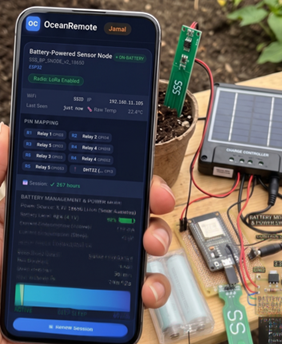
🔋 Deep Sleep - Complete Power Saving Guide
⚡ What You'll Learn in This Lesson:
- Extend battery life from days to months
- Master ESP32 and ESP8266 deep sleep modes
- Preserve data across sleep cycles with RTC memory
- Wake up using timers, external pins, or touch sensors
- Calculate realistic battery life for your projects
🔋 Why Deep Sleep Matters for African Agriculture
Solar-powered sensors in remote fields need to run for months without maintenance. Deep sleep makes this possible!
| Mode | ESP32 Current | ESP8266 Current | Use Case |
|---|---|---|---|
| Active (WiFi on) | 120-180mA | 70-100mA | Data transmission |
| Light Sleep | ~0.8mA | Not available | Fast wake-up needed |
| Deep Sleep | 2.5μA (0.0025mA!) | 20μA | ⭐ Battery-powered sensors |
| Shutdown | 1μA | 0.5μA | Requires physical reset |
Deep sleep reduces power consumption by 50,000x! A 2000mAh battery lasts:
- Without deep sleep: ~10 hours
- With deep sleep: ~200 days!
📖 ESP32 Deep Sleep with Timer (Most Common)
/* * ESP32 Deep Sleep with Timer Wake-Up * Perfect for weather stations, soil sensors, and data loggers * * Battery life: 2000mAh battery lasts 6-12 months! * * Components Required: * - ESP32 board * - Connect GPIO16 to RST pin (for wake-up!) */ #include// ========== RTC DATA (Survives deep sleep) ========== // Regular variables reset when ESP32 sleeps // RTC_DATA_ATTR variables keep their value! RTC_DATA_ATTR int bootCount = 0; RTC_DATA_ATTR unsigned long totalWakeUps = 0; // Optional: Store sensor readings across sleep RTC_DATA_ATTR float lastTemperature = 0; RTC_DATA_ATTR float lastHumidity = 0; // ========== CONFIGURATION ========== const unsigned long SLEEP_MINUTES = 15; // Sleep duration in minutes void print_wakeup_reason() { esp_sleep_wakeup_cause_t reason = esp_sleep_get_wakeup_cause(); switch(reason) { case ESP_SLEEP_WAKEUP_TIMER: Serial.println("⏰ Wake-up caused by timer"); break; case ESP_SLEEP_WAKEUP_EXT0: Serial.println("🔘 Wake-up caused by external pin (RTC_IO)"); break; case ESP_SLEEP_WAKEUP_EXT1: Serial.println("🔘 Wake-up caused by external pin (RTC_CNTL)"); break; case ESP_SLEEP_WAKEUP_TOUCHPAD: Serial.println("👆 Wake-up caused by touchpad"); break; case ESP_SLEEP_WAKEUP_ULP: Serial.println("🧠 Wake-up caused by ULP program"); break; default: Serial.printf("🔄 Wake-up caused by %d (other reason)\n", reason); break; } } void setup() { Serial.begin(115200); delay(1000); // Give serial time to initialize // Increment boot counter bootCount++; totalWakeUps++; Serial.println("========================================"); Serial.printf("🔋 ESP32 Deep Sleep Demo - Wake #%d\n", bootCount); Serial.println("========================================"); // Print wake-up reason print_wakeup_reason(); // ========== READ YOUR SENSORS HERE ========== // Example: Read soil moisture, temperature, humidity int soilMoisture = analogRead(32); float temperature = 25.5; // Replace with actual sensor reading Serial.printf("📊 Soil moisture: %d\n", soilMoisture); Serial.printf("🌡️ Temperature: %.1f°C\n", temperature); // ========== SEND DATA TO OCEANREMOTE ========== // Connect to WiFi and send data // ... your data sending code here ... // ========== DEEP SLEEP CONFIGURATION ========== // Calculate sleep time in microseconds unsigned long sleepTimeUs = SLEEP_MINUTES * 60 * 1000000ULL; Serial.printf("💤 Going to deep sleep for %lu minutes\n", SLEEP_MINUTES); Serial.printf(" Sleep time: %lu microseconds\n", sleepTimeUs); Serial.printf(" Battery estimate: ~%d days\n", (int)((2000 * 24) / (0.0025 * 24 * 60 / 15))); Serial.println("========================================\n"); // Enable timer wake-up esp_sleep_enable_timer_wakeup(sleepTimeUs); // Optional: Enable touch wake-up // touchSleepWakeUpEnable(T0, 40); // Wake when touch pad value < 40 // Optional: Enable external pin wake-up // esp_sleep_enable_ext0_wakeup(GPIO_NUM_33, 1); // Wake when GPIO33 goes HIGH // Enter deep sleep esp_deep_sleep_start(); // This code never executes } void loop() { // Empty - never reached due to deep sleep }
For timer wake-up to work, you MUST connect GPIO16 to the RST pin! Without this, ESP32 won't wake up.
ESP32: GPIO16 ──────────► RST pin
        (This allows the internal timer to reset the chip)
📖 ESP8266 Deep Sleep (Simpler!)
ESP8266 deep sleep doesn't require external wiring - it's built-in!
/* * ESP8266 Deep Sleep with Timer Wake-Up * No external wiring needed - works out of the box! * * Note: ESP8266 deep sleep consumes ~20μA (vs 2.5μA for ESP32) * Still lasts months on a battery! */ #include// ESP8266 has limited RTC memory (512 bytes) // Use it for critical data only RTC_DATA_ATTR int bootCount = 0; const unsigned long SLEEP_SECONDS = 300; // 5 minutes (ESP8266 uses seconds) void setup() { Serial.begin(115200); delay(1000); bootCount++; Serial.println("========================================"); Serial.printf("🔋 ESP8266 Deep Sleep Demo - Wake #%d\n", bootCount); Serial.println("========================================"); // ========== READ SENSORS ========== // ESP8266 has only one ADC pin (A0) int soilMoisture = analogRead(A0); Serial.printf("📊 Soil moisture: %d\n", soilMoisture); // ========== CONNECT TO WIFI AND SEND DATA ========== // ... your code here ... // ========== PREPARE FOR DEEP SLEEP ========== // Disable WiFi to save power before sleeping WiFi.disconnect(true); WiFi.mode(WIFI_OFF); Serial.printf("💤 Going to deep sleep for %lu seconds\n", SLEEP_SECONDS); Serial.printf(" Battery estimate: ~%d days (2000mAh)\n", (int)((2000 * 24) / (0.02 * 24 * 60 / 5))); Serial.println("========================================\n"); // ESP8266 deep sleep (microseconds) // Note: Maximum sleep time is 4,294,967,295 microseconds (~71 minutes) ESP.deepSleep(SLEEP_SECONDS * 1000000); // Alternative with no wake-up (battery saving, needs reset) // ESP.deepSleep(0); } void loop() {}
Maximum sleep time is ~71 minutes (2³² microseconds). For longer sleeps, use ESP32 instead.
🔘 External Wake-Up (Button / Sensor Trigger)
Wake the ESP32 when something interesting happens, not just on a timer!
/* * ESP32 External Wake-Up - Button or Sensor Trigger * Perfect for: Wake when motion detected, button pressed, or threshold exceeded */ #include#define WAKE_UP_PIN GPIO_NUM_33 // GPIO33 - Connect button to this pin // Button wiring: GPIO33 ──┬── 10kΩ ──► 3.3V // └── Button ──► GND RTC_DATA_ATTR int bootCount = 0; void setup() { Serial.begin(115200); bootCount++; Serial.println("========================================"); Serial.printf("🔘 ESP32 External Wake-Up Demo - Wake #%d\n", bootCount); Serial.println("========================================"); // Check wake-up reason esp_sleep_wakeup_cause_t cause = esp_sleep_get_wakeup_cause(); if (cause == ESP_SLEEP_WAKEUP_EXT0) { Serial.println("✅ Woke up by button press!"); // Button was pressed - do something special } else { Serial.println("⏰ First boot or other wake reason"); } // Read sensors, send data, etc. // ... // Configure external wake-up // Wake when WAKE_UP_PIN goes HIGH (1) or LOW (0) esp_sleep_enable_ext0_wakeup(WAKE_UP_PIN, 1); // HIGH = wake Serial.println("💤 Going to deep sleep. Press button on GPIO33 to wake!"); esp_deep_sleep_start(); }
📊 ESP32 Power Consumption Calculator
Use this formula to estimate battery life:
/* * Battery Life Calculator for ESP32 Deep Sleep * * Formula: Battery Life (days) = Battery Capacity (mAh) / Daily Consumption (mAh/day) * * Daily Consumption = (Wake Current × Wake Time + Sleep Current × Sleep Time) × Cycles per Day */ #includeRTC_DATA_ATTR int bootCount = 0; const unsigned long LOOP_INTERVAL_SECONDS = 900; // 15 minutes // Power constants (measured in microamps) const float WAKE_CURRENT_MA = 150.0; // 150mA during operation const float SLEEP_CURRENT_MA = 0.0025; // 2.5μA during deep sleep const float BATTERY_CAPACITY_MAH = 2000; // 2000mAh battery void calculateBatteryLife() { // Wake time in seconds (measure with millis()) // For this example, we'll assume 3 seconds float wakeTimeSeconds = 3.0; float sleepTimeSeconds = LOOP_INTERVAL_SECONDS - wakeTimeSeconds; // Energy per cycle (mAh) float wakeEnergy = WAKE_CURRENT_MA * (wakeTimeSeconds / 3600.0); float sleepEnergy = SLEEP_CURRENT_MA * (sleepTimeSeconds / 3600.0); float totalEnergyPerCycle = wakeEnergy + sleepEnergy; // Cycles per day float cyclesPerDay = 86400.0 / LOOP_INTERVAL_SECONDS; // Daily consumption float dailyConsumption = totalEnergyPerCycle * cyclesPerDay; // Battery life in days float batteryLifeDays = BATTERY_CAPACITY_MAH / dailyConsumption; Serial.println("========================================"); Serial.println("🔋 BATTERY LIFE CALCULATION"); Serial.println("========================================"); Serial.printf("Wake current: %.1fmA\n", WAKE_CURRENT_MA); Serial.printf("Sleep current: %.4fmA (%.1fuA)\n", SLEEP_CURRENT_MA, SLEEP_CURRENT_MA * 1000); Serial.printf("Wake time: %.1f seconds\n", wakeTimeSeconds); Serial.printf("Sleep interval: %d seconds (%d minutes)\n", LOOP_INTERVAL_SECONDS, LOOP_INTERVAL_SECONDS / 60); Serial.println("----------------------------------------"); Serial.printf("Energy per cycle: %.6fmAh\n", totalEnergyPerCycle); Serial.printf("Cycles per day: %.1f\n", cyclesPerDay); Serial.printf("Daily consumption: %.3fmAh\n", dailyConsumption); Serial.println("----------------------------------------"); Serial.printf("🔋 Battery life: %.0f DAYS (%.1f MONTHS)\n", batteryLifeDays, batteryLifeDays / 30); Serial.println("========================================"); } void setup() { Serial.begin(115200); bootCount++; calculateBatteryLife(); // Your sensor reading code... esp_sleep_enable_timer_wakeup(LOOP_INTERVAL_SECONDS * 1000000ULL); esp_deep_sleep_start(); }
📊 Sleep Mode Comparison Table
| Feature | Modem Sleep | Light Sleep | Deep Sleep |
|---|---|---|---|
| CPU | On | Paused | Off |
| WiFi | Off (can auto-on) | Off | Off |
| Current (ESP32) | ~30mA | ~0.8mA | 2.5μA |
| Wake-up Time | milliseconds | milliseconds | ~100μs |
| RTC Memory | N/A | N/A | 8KB retained |
| ULP Coprocessor | Not available | Not available | ✅ Available |
A coffee farmer deployed 3 ESP8266-based soil sensors with 5-minute deep sleep intervals:
- 🔋 Battery life: 6+ months on 18650 batteries (no solar needed!)
- 💧 Water savings: 42% reduction using soil moisture data
- 📈 Yield increase: 31% better coffee cherry production
- 💰 ROI: System paid for itself in 2 months
"I check my soil moisture from my phone while in town. The batteries lasted the entire growing season!" - Farmer, Tanzania
🔧 Troubleshooting Deep Sleep Issues
| Problem | Cause | Solution |
|---|---|---|
| ESP32 won't wake up | GPIO16 not connected to RST | Wire GPIO16 to RST pin! |
| ESP32 resets immediately after wake | Power supply unstable | Add 1000μF capacitor across power rails |
| Higher current than expected | Peripherals still powered | Turn off sensors before sleep, use transistor to cut power |
| RTC_DATA_ATTR values resetting | Not enough RTC memory | ESP32 has 8KB RTC, ESP8266 has 512 bytes. Use sparingly! |
| Serial monitor shows garbage | Baud rate mismatch or startup timing | Add delay(1000) before Serial.begin() |
You've mastered deep sleep power management!
✅ ESP32 deep sleep with timer
✅ ESP8266 deep sleep (simpler!)
✅ External wake-up triggers
✅ Battery life calculation
✅ RTC memory for persistent data
Your sensors can now run for MONTHS on a single battery charge!
// ESP32
esp_sleep_enable_timer_wakeup(microseconds);
esp_sleep_enable_ext0_wakeup(pin, level);
esp_sleep_enable_touchpad_wakeup();
esp_deep_sleep_start();

// ESP8266
ESP.deepSleep(microseconds);
- Apply these concepts directly to your farm or project.
- Take notes on important details for the quiz.
- Use the button below to track your progress.