Sending Data to OceanRemote Cloud
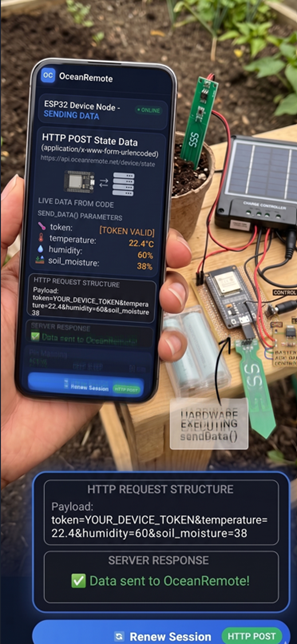
📤 Sending Data to OceanRemote - Complete Cloud Integration Guide
☁️ What You'll Learn in This Lesson:
- Send sensor data from ESP32/ESP8266 to OceanRemote cloud
- Master HTTP POST requests for IoT data transmission
- Handle connection errors and implement retries
- Optimize data payload size to save bandwidth
- View your farm data from anywhere in the world
🌐 Why Send Data to the Cloud?
Without cloud connectivity, your sensor data stays on the device. With OceanRemote, you can:
| Benefit | Description |
|---|
📖 Complete OceanRemote Integration Code
/* * OceanRemote Cloud Integration - Complete Example * Send sensor data to OceanRemote from ESP32/ESP8266 * * Features: * - HTTP POST with error handling * - Connection timeout * - Retry mechanism * - Data payload optimization * * Author: OceanRemote Education */ #include#include // ========== WIFI CONFIGURATION ========== const char* ssid = "YOUR_WIFI_NAME"; const char* password = "YOUR_WIFI_PASSWORD"; // ========== OCEANREMOTE CONFIGURATION ========== // Get your token from: OceanRemote Dashboard → Your Device → Generate Code const char* token = "YOUR_DEVICE_TOKEN"; const char* serverUrl = "https://api.oceanremote.net/device/state"; // ========== SENSOR PINS (Example) ========== #define SOIL_PIN 32 #define DHT_PIN 16 void setup() { Serial.begin(115200); delay(1000); Serial.println("========================================"); Serial.println("🌍 OceanRemote Data Sender v1.0"); Serial.println("========================================"); // Connect to WiFi connectToWiFi(); // Read sensors int soilMoisture = readSoilMoisture(); float temperature = readTemperature(); float humidity = readHumidity(); // Send data to OceanRemote sendToOceanRemote(temperature, humidity, soilMoisture); // Optional: Deep sleep to save power // esp_sleep_enable_timer_wakeup(15 * 60 * 1000000); // esp_deep_sleep_start(); } void connectToWiFi() { Serial.print("📡 Connecting to WiFi"); WiFi.begin(ssid, password); int attempts = 0; while (WiFi.status() != WL_CONNECTED && attempts < 20) { delay(500); Serial.print("."); attempts++; } if (WiFi.status() == WL_CONNECTED) { Serial.println("\n✅ WiFi connected!"); Serial.print("📶 IP: "); Serial.println(WiFi.localIP()); } else { Serial.println("\n❌ WiFi connection failed!"); } } int readSoilMoisture() { int raw = analogRead(SOIL_PIN); // Convert to percentage (calibrate for your sensor) int moisture = map(raw, 3800, 1500, 0, 100); moisture = constrain(moisture, 0, 100); return moisture; } float readTemperature() { // Replace with actual temperature sensor reading // Example: return dht.readTemperature(); return 25.5; } float readHumidity() { // Replace with actual humidity sensor reading // Example: return dht.readHumidity(); return 65.0; } void sendToOceanRemote(float temperature, float humidity, int soilMoisture) { if (WiFi.status() != WL_CONNECTED) { Serial.println("❌ Not connected to WiFi. Cannot send data."); return; } Serial.println("📤 Sending data to OceanRemote..."); HTTPClient http; http.begin(serverUrl); http.addHeader("Content-Type", "application/x-www-form-urlencoded"); // Build data payload String data = "token=" + String(token); data += "&temperature=" + String(temperature); data += "&humidity=" + String(humidity); data += "&soil_moisture=" + String(soilMoisture); // Optional: Add timestamp data += "×tamp=" + String(millis() / 1000); Serial.print("📦 Payload: "); Serial.println(data); // Send POST request int httpCode = http.POST(data); if (httpCode > 0) { Serial.printf("✅ Data sent! HTTP Code: %d\n", httpCode); if (httpCode == 200) { Serial.println("🎉 OceanRemote received your data!"); } else if (httpCode == 401) { Serial.println("❌ Invalid token! Check your device token."); } } else { Serial.printf("❌ Failed to send data. Error: %d\n", httpCode); Serial.println(" Check WiFi connection and server URL."); } http.end(); } void loop() { // Empty - everything happens in setup() // For continuous monitoring, move code here and add delay }
🔐 Secure Data Transmission with Retry Logic
Production-ready code with error recovery:
/* * Secure Data Transmission with Retry Logic * Guarantees data delivery even with spotty WiFi */ #include#include const char* ssid = "YOUR_WIFI"; const char* password = "YOUR_PASSWORD"; const char* token = "YOUR_TOKEN"; const char* serverUrl = "https://api.oceanremote.net/device/state"; const int MAX_RETRIES = 3; const int RETRY_DELAY_MS = 2000; bool sendWithRetry(String data) { for (int attempt = 1; attempt <= MAX_RETRIES; attempt++) { Serial.printf("📤 Attempt %d/%d\n", attempt, MAX_RETRIES); // Ensure WiFi is connected if (WiFi.status() != WL_CONNECTED) { Serial.println("📡 Reconnecting to WiFi..."); WiFi.reconnect(); delay(1000); } HTTPClient http; http.begin(serverUrl); http.addHeader("Content-Type", "application/x-www-form-urlencoded"); http.setTimeout(5000); // 5 second timeout int httpCode = http.POST(data); if (httpCode == 200) { Serial.println("✅ Data sent successfully!"); http.end(); return true; } else if (httpCode == 401) { Serial.println("❌ Invalid token! Check your device token."); http.end(); return false; // Don't retry - token issue won't resolve } else { Serial.printf("⚠️ Attempt %d failed. HTTP Code: %d\n", attempt, httpCode); http.end(); if (attempt < MAX_RETRIES) { Serial.printf(" Retrying in %d seconds...\n", RETRY_DELAY_MS / 1000); delay(RETRY_DELAY_MS); } } } Serial.println("❌ All retry attempts failed. Data will be sent next cycle."); return false; } void setup() { Serial.begin(115200); // Connect to WiFi WiFi.begin(ssid, password); while (WiFi.status() != WL_CONNECTED) delay(500); // Prepare data String data = "token=" + String(token); data += "&temperature=25.5"; data += "&humidity=65.2"; data += "&soil_moisture=45"; data += "&battery=3.8"; // Send with retry sendWithRetry(data); } void loop() {}
📦 Optimizing Data Payload for Low Bandwidth
Reduce data size for slow connections (2G/3G in rural areas):
/*
 * Optimized Data Payload for Low Bandwidth
 * Perfect for 2G/3G networks in rural Africa
 */

void sendOptimizedData(float temp, float hum, int soil, float batt) {
    if (WiFi.status() != WL_CONNECTED) return;

    HTTPClient http;
    http.begin("https://api.oceanremote.net/device/state");
    http.addHeader("Content-Type", "application/x-www-form-urlencoded");

    // Option 1: Full parameter names (readable, larger)
    // String data = "token=" + String(token) + "&temperature=" + String(temp);
    // Size: ~60 bytes

    // Option 2: Short parameter names (optimized, smaller)
    // String data = "t=" + String(token) + "&tmp=" + String(temp);
    // Size: ~40 bytes

    // Option 3: Binary encoding (very efficient, complex)
    // Not recommended for beginners

    // Recommended: Use short but clear names
    String data = "t=" + String(token);
    data += "&tmp=" + String(temp);      // temperature -> tmp
    data += "&hum=" + String(hum);       // humidity -> hum
    data += "&soil=" + String(soil);     // soil_moisture -> soil
    data += "&bat=" + String(batt);      // battery -> bat

    Serial.print("📦 Optimized payload size: ");
    Serial.print(data.length());
    Serial.println(" bytes");

    http.POST(data);
    http.end();
}
📊 Supported Data Parameters
OceanRemote accepts these parameters in your POST request:
| Parameter | Type | Description | Example |
|---|---|---|---|
| token | Required | Device authentication token | oc_perm_xxxxx |
| temperature | Optional | Temperature in Celsius | 25.5 |
| humidity | Optional | Humidity percentage | 65.2 |
| soil_moisture | Optional | Soil moisture percentage | 45 |
| relay1..relay5 | Optional | Relay states (1/0) | 1 |
| led_state | Optional | LED status (1/0) | 0 |
🔧 Complete Sensor Station Example
/* * Complete Solar-Powered Sensor Station with OceanRemote * Sends soil moisture, temperature, humidity, and battery voltage * Deep sleep between readings for months of battery life */ #include#include #include // ========== PINS ========== #define SOIL_PIN 32 #define DHT_PIN 16 #define BATTERY_PIN 34 #define DHTTYPE DHT22 // ========== WIFI ========== const char* ssid = "YOUR_WIFI"; const char* password = "YOUR_PASSWORD"; const char* token = "YOUR_TOKEN"; // ========== CALIBRATION ========== const int SOIL_DRY = 3800; const int SOIL_WET = 1500; DHT dht(DHT_PIN, DHTTYPE); // RTC counter RTC_DATA_ATTR int bootCount = 0; void setup() { Serial.begin(115200); bootCount++; Serial.println("========================================"); Serial.printf("🌱 Sensor Station - Cycle #%d\n", bootCount); Serial.println("========================================"); // Read sensors int soilRaw = analogRead(SOIL_PIN); int soilPercent = map(soilRaw, SOIL_DRY, SOIL_WET, 0, 100); soilPercent = constrain(soilPercent, 0, 100); dht.begin(); float temp = dht.readTemperature(); float hum = dht.readHumidity(); int batteryRaw = analogRead(BATTERY_PIN); float batteryVoltage = batteryRaw * (3.3 / 4095.0) * 2.0; // Voltage divider 2x // Print readings Serial.printf("💧 Soil moisture: %d%%\n", soilPercent); Serial.printf("🌡️ Temperature: %.1f°C\n", temp); Serial.printf("💧 Humidity: %.1f%%\n", hum); Serial.printf("🔋 Battery: %.2fV\n", batteryVoltage); // Connect to WiFi Serial.print("📡 Connecting to WiFi"); WiFi.begin(ssid, password); int attempts = 0; while (WiFi.status() != WL_CONNECTED && attempts < 20) { delay(500); Serial.print("."); attempts++; } if (WiFi.status() == WL_CONNECTED) { Serial.println("\n✅ WiFi connected!"); // Send data HTTPClient http; http.begin("https://api.oceanremote.net/device/state"); http.addHeader("Content-Type", "application/x-www-form-urlencoded"); String data = "token=" + String(token); data += "&soil_moisture=" + String(soilPercent); data += "&temperature=" + String(temp); data += "&humidity=" + String(hum); data += "&battery=" + String(batteryVoltage); data += "&boot_count=" + String(bootCount); int httpCode = http.POST(data); if (httpCode == 200) { Serial.println("✅ Data sent to OceanRemote!"); } else { Serial.printf("❌ Failed! HTTP Code: %d\n", httpCode); } http.end(); WiFi.disconnect(true); WiFi.mode(WIFI_OFF); } else { Serial.println("\n❌ WiFi failed - data will be sent next cycle"); } // Deep sleep for 15 minutes Serial.println("💤 Going to deep sleep for 15 minutes..."); esp_sleep_enable_timer_wakeup(15 * 60 * 1000000ULL); esp_deep_sleep_start(); } void loop() {}
A farmer installed 5 soil moisture sensors connected to OceanRemote:
- 📡 Setup: ESP32 + capacitive soil sensor + solar panel
- 💧 Result: 45% water savings using moisture-based irrigation
- 📈 Yield: 32% increase in maize production
- 📱 Monitoring: Farmer checks soil moisture from phone while in town
"I never imagined I could monitor my fields from my phone. The data helps me water only when needed!" - Farmer, Zambia
- ❌ HTTP 401 Unauthorized: Invalid token. Get a new token from OceanRemote dashboard.
- ❌ HTTP 404 Not Found: Wrong server URL. Use:
https://api.oceanremote.net/device/state - ❌ Connection timeout: WiFi signal weak. Move ESP32 closer to router.
- ❌ Data not appearing in dashboard: Check that parameter names match exactly (case-sensitive).
- ❌ ESP32 resets during POST: Power supply issue - add 1000μF capacitor.
📊 Testing Your Connection
Use this diagnostic sketch to verify your OceanRemote setup:
/* * OceanRemote Connection Tester * Verifies WiFi and API connectivity */ #include#include const char* ssid = "YOUR_WIFI"; const char* password = "YOUR_PASSWORD"; const char* token = "YOUR_TOKEN"; void setup() { Serial.begin(115200); delay(1000); Serial.println("🔧 OceanRemote Connection Tester"); Serial.println("================================="); // Test 1: WiFi Serial.print("📡 Testing WiFi... "); WiFi.begin(ssid, password); int attempts = 0; while (WiFi.status() != WL_CONNECTED && attempts < 20) { delay(500); attempts++; } if (WiFi.status() == WL_CONNECTED) { Serial.println("✅ PASS"); Serial.printf(" IP: %s\n", WiFi.localIP().toString().c_str()); Serial.printf(" Signal: %d dBm\n", WiFi.RSSI()); } else { Serial.println("❌ FAIL - Check SSID/password"); return; } // Test 2: API Endpoint Serial.print("🌐 Testing OceanRemote API... "); HTTPClient http; http.begin("https://api.oceanremote.net/device/state"); http.addHeader("Content-Type", "application/x-www-form-urlencoded"); String testData = "token=" + String(token); testData += "&temperature=25.5"; testData += "&test=1"; int httpCode = http.POST(testData); if (httpCode == 200) { Serial.println("✅ PASS"); Serial.println(" Data received by OceanRemote!"); } else { Serial.printf("❌ FAIL - HTTP %d\n", httpCode); if (httpCode == 401) { Serial.println(" Invalid token! Check your device token."); } } http.end(); Serial.println("\n✅ Test complete!"); } void loop() {}
You can now send sensor data to OceanRemote cloud!
✅ HTTP POST requests working
✅ Error handling and retries implemented
✅ Data payload optimization
✅ Complete sensor station example
🌍 Your farm data is now accessible from anywhere!
// Endpoint
POST https://api.oceanremote.net/device/state

// Headers
Content-Type: application/x-www-form-urlencoded

// Required Parameter
token=YOUR_DEVICE_TOKEN

// Optional Parameters
temperature=25.5
humidity=65.2
soil_moisture=45
relay1=1
relay2=0
led_state=1
- Apply these concepts directly to your farm or project.
- Take notes on important details for the quiz.
- Use the button below to track your progress.