← Back to Course
Using DHT22 for Weather Monitoring
🔌 Connecting DHT22 for Weather Data
🌡️ What You'll Learn:
- 🔌 Wire DHT22 temperature and humidity sensor to ESP32/ESP8266
- 📊 Read accurate temperature (±0.5°C) and humidity (±2-5%)
- 🌾 Use weather data for crop-specific irrigation decisions
- 💧 Save 15-25% more water by factoring in humidity and temperature
🛠️ Components You Need
- 🔹 DHT22 Temperature & Humidity Sensor — $8-12 · High accuracy (±0.5°C, ±2% RH)
- 🔹 ESP32 or ESP8266 board — $8-12 · Any digital GPIO pin works
- 🔹 10kΩ Resistor — $1 · Pull-up resistor (some modules include it)
- 🔹 4x Jumper wires — $2 · Female-to-female or male-to-female
- 🔹 Optional: Weather shield — $10 · Protects from sun/rain outdoors
💡 DHT22 vs DHT11 Comparison:
- DHT22 (Recommended): ±0.5°C accuracy, ±2% humidity, 0.5Hz reading (every 2 seconds)
- DHT11 (Cheaper): ±2°C accuracy, ±5% humidity, 1Hz reading (every second)
- Our choice: DHT22 for farming — better accuracy for crop decisions
🔗 Wiring Diagram
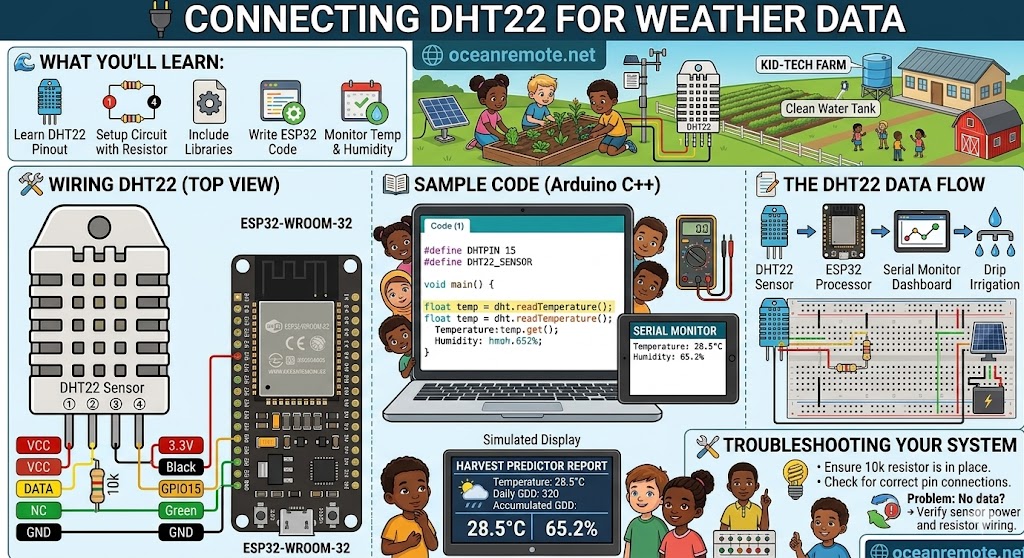
DHT22 Pinout (front view, pins down):
┌─────────────┐
│ (1) VCC     │ → 3.3V (or 5V)
│ (2) DATA    │ → GPIO15 + 10kΩ resistor to 3.3V
│ (3) NC      │ → Not connected
│ (4) GND     │ → GND
└─────────────┘

ESP32 Connection:
DHT22 VCC  → ESP32 3.3V
DHT22 DATA → ESP32 GPIO15 + 10kΩ pull-up to 3.3V
DHT22 GND  → ESP32 GND

⚠️ Some modules have built-in pull-up resistors (3 pins only)
    Check your module — you may not need the external resistor!
⚠️ CRITICAL: Pull-Up Resistor Required!
DHT22 needs a 10kΩ pull-up resistor between DATA and VCC. Without it, readings will fail or be incorrect. Some pre-built modules include this resistor (3-pin version). For 4-pin bare sensor, you MUST add it!
📖 Basic DHT22 Code
#include "DHT.h"

#define DHTPIN 15
#define DHTTYPE DHT22

DHT dht(DHTPIN, DHTTYPE);

void setup() {
    Serial.begin(115200);
    dht.begin();
    Serial.println("🌡️ DHT22 Weather Sensor Ready");
    Serial.println("=================================");
}

void loop() {
    float temp = dht.readTemperature();
    float hum = dht.readHumidity();

    // Check for read errors
    if (isnan(temp) || isnan(hum)) {
        Serial.println("❌ Sensor read failed! Check wiring.");
    } else {
        Serial.printf("🌡️ Temperature: %.1f°C\n", temp);
        Serial.printf("💧 Humidity: %.1f%%\n", hum);

        // Crop-specific recommendations
        if (temp > 35) {
            Serial.println("⚠️ HEAT WARNING! Increase irrigation by 30-50%");
        } else if (temp < 15) {
            Serial.println("⚠️ COLD WARNING! Reduce irrigation, risk of root rot");
        }

        if (hum < 30) {
            Serial.println("⚠️ LOW HUMIDITY! Plants stressed, water immediately");
        } else if (hum > 80) {
            Serial.println("⚠️ HIGH HUMIDITY! Watch for fungal diseases");
        }
    }

    delay(60000); // Read every minute
}
📖 Advanced Code with Heat Index (Feels Like Temperature)
#include "DHT.h"

#define DHTPIN 15
#define DHTTYPE DHT22

DHT dht(DHTPIN, DHTTYPE);
float lastValidTemp = 25.0;
float lastValidHum = 50.0;

float calculateHeatIndex(float temp, float humidity) {
    // Simplified heat index formula for < 40°C
    float hi = temp;
    if (temp >= 27) {
        hi = -8.784695 + 1.61139411 * temp + 2.338549 * humidity;
        hi += -0.14611605 * temp * humidity;
        hi += -0.01230809 * temp * temp;
        hi += -0.01642482 * humidity * humidity;
        hi += 0.00221173 * temp * temp * humidity;
        hi += 0.00072546 * temp * humidity * humidity;
        hi += -0.00000358 * temp * temp * humidity * humidity;
    }
    return hi;
}

void setup() {
    Serial.begin(115200);
    dht.begin();
    Serial.println("🌡️ Advanced DHT22 Weather Monitor");
    Serial.println("=================================");
}

void loop() {
    float temp = dht.readTemperature();
    float hum = dht.readHumidity();

    // Use last valid values if read fails
    if (isnan(temp)) temp = lastValidTemp;
    else lastValidTemp = temp;

    if (isnan(hum)) hum = lastValidHum;
    else lastValidHum = hum;

    float heatIndex = calculateHeatIndex(temp, hum);

    Serial.printf("🌡️ Actual Temp: %.1f°C\n", temp);
    Serial.printf("🔥 Feels Like: %.1f°C\n", heatIndex);
    Serial.printf("💧 Humidity: %.1f%%\n", hum);

    // Irrigation decision logic
    int waterIncrease = 0;

    if (heatIndex > 35) waterIncrease += 40;
    else if (temp > 35) waterIncrease += 30;
    else if (temp > 30) waterIncrease += 15;

    if (hum < 30) waterIncrease += 25;
    else if (hum < 45) waterIncrease += 10;

    if (waterIncrease > 0) {
        Serial.printf("💧 Increase watering by %d%% (heat + low humidity)\n", waterIncrease);
    } else if (hum > 80 || temp < 15) {
        Serial.println("💧 Reduce watering by 30% (high humidity or cold)");
    } else {
        Serial.println("✅ Conditions optimal. Normal irrigation.");
    }

    delay(120000); // Read every 2 minutes
}
💡 Understanding Crop-Specific Thresholds:
- 🍅 Tomatoes: Optimal 20-28°C, humidity 50-70% | Stop growing above 35°C
- 🌽 Maize/Corn: Optimal 18-32°C, humidity 40-60% | Heat stress above 35°C
- 🥬 Leafy greens: Optimal 15-22°C, humidity 60-80% | Bolt (flower) above 28°C
- 🌶️ Peppers: Optimal 20-30°C, humidity 50-70% | Thrives in heat
- 🥔 Potatoes: Optimal 15-25°C, humidity 60-80% | High humidity = blight risk
📖 Case Study — DHT22 Saves 25% Water, Uganda:
A 8-acre tomato farm added DHT22 sensors to their irrigation controller:
- 🌡️ Heat wave detection: Automatically increased watering by 40% during 38°C days
- 💧 Water savings: 25% reduction on normal days (didn't over-water when cool)
- 💰 Cost savings: $240/year on water + $180/year on pump electricity
- 📈 Yield increase: 18% better production (reduced heat stress)
- 🛡️ Disease prevention: Reduced watering when humidity >80% (blight prevention)
"The DHT22 tells me when it's too hot or too humid. My tomatoes don't get stressed anymore, and I'm using less water!" — Farmer, Wakiso District
🌟 Integration with OceanRemote Irrigation System:
// Add weather logic to your irrigation code
float temp = dht.readTemperature();
float hum = dht.readHumidity();

if (temp > 35) {
    // Heat wave - increase watering
    irrigationDuration = baseDuration * 1.5;
} else if (hum < 30) {
    // Low humidity - plants stressed
    irrigationDuration = baseDuration * 1.25;
} else if (hum > 80 || temp < 15) {
    // Cool/humid - reduce watering
    irrigationDuration = baseDuration * 0.7;
} else {
    irrigationDuration = baseDuration;
}
⚠️ Common DHT22 Problems & Solutions:
- Readings return NaN: Check wiring, add 10k pull-up resistor, or increase delay between reads (minimum 2 seconds)
- Inaccurate temperature: Sensor self-heats if powered continuously. Read every 2-60 seconds only
- Humidity stuck at 100%: Sensor may be contaminated. Clean gently with isopropyl alcohol
- Slow readings: DHT22 takes 2-3 seconds per read — normal behavior!
- Outdoor use: Sensor is not waterproof. Use a weather shield or mount under cover
- ESP8266 note: Works fine, but avoid using GPIO16 (D0) which has special functions
💡 Pro Tips for Accurate Readings:
- 📍 Mount sensor at crop canopy height (not ground level) for accurate microclimate
- 🌳 Place in open area away from walls, concrete, or direct afternoon sun
- 💨 Ensure good airflow around sensor for humidity accuracy
- ⏱️ Read every 5-15 minutes for irrigation — no need for second-by-second data
- 📊 Average 3-5 readings to reduce noise:
temp = (t1+t2+t3)/3;
🎯 Key Takeaways:
- ✅ DHT22 provides accurate temperature (±0.5°C) and humidity (±2-5%) for $8-12
- ✅ A 10kΩ pull-up resistor between DATA and VCC is REQUIRED for reliable readings
- ✅ High temperature (>35°C) = increase irrigation by 30-50%
- ✅ Low humidity (<30%) = increase irrigation by 20-30% (plant stress)
- ✅ High humidity (>80%) + cool temps = reduce watering (fungus risk)
- ✅ DHT22 pays for itself in 1-3 months through water and electricity savings
- ✅ Use last valid values in code to handle occasional read failures
💡 Key Takeaways:
- Apply these concepts directly to your farm or project.
- Take notes on important details for the quiz.
- Use the button below to track your progress.
×
![Enlarged view]()