← Back to Course
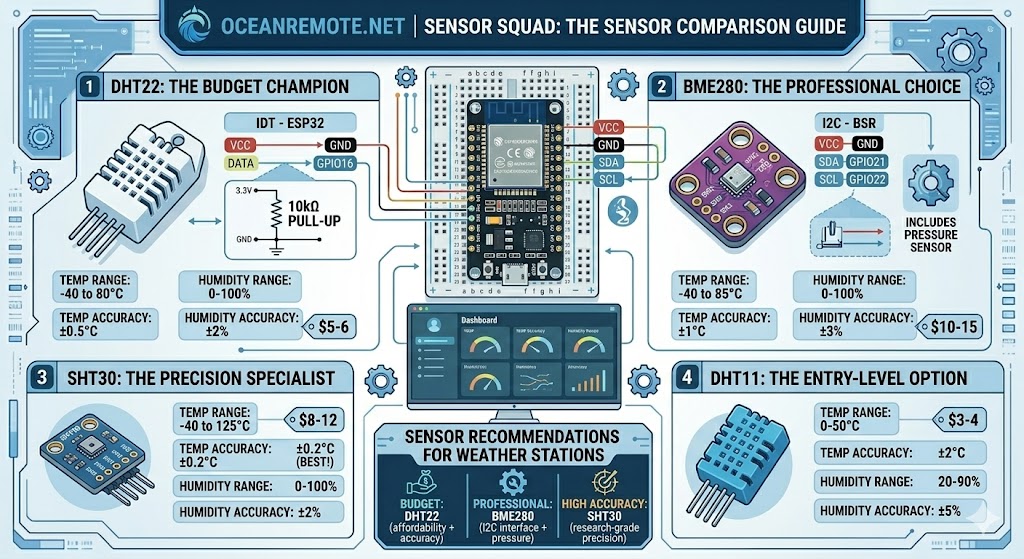
Temperature and Humidity Sensor Comparison
🌡️ Temperature and Humidity Sensor Comparison - Choose the Right Sensor for Your Farm
🌡️ What You'll Learn in This Lesson:
- 📊 Compare 8+ temperature and humidity sensors for your farm
- 🎯 Choose the right sensor based on accuracy, budget, and application
- 🔌 Learn proper wiring for DHT11, DHT22, BME280, SHT30, and more
- 💻 Complete code examples for each sensor type
- 📈 Understand which sensor works best for weather stations, greenhouses, and soil monitoring
📊 Complete Sensor Comparison Table
| Sensor | Temp Range | Temp Accuracy | Humidity Range | Humidity Accuracy | Interface | Price | Best For |
|---|---|---|---|---|---|---|---|
| DHT11 | 0-50°C | ±2°C | 20-90% | ±5% | 1-Wire | $3-4 | Budget projects |
| DHT22 | -40 to 80°C | ±0.5°C | 0-100% | ±2% | 1-Wire | $5-6 | Farm monitoring |
| BME280 | -40 to 85°C | ±1°C | 0-100% | ±3% | I2C/SPI | $10-15 | Weather stations |
| SHT30 | -40 to 125°C | ±0.2°C | 0-100% | ±2% | I2C | $8-12 | High accuracy |
| HDC2080 | -40 to 125°C | ±0.2°C | 0-100% | ±2% | I2C | $5-8 | Low power IoT |
💡 Sensor Recommendation Guide - Quick Selection:
- 💰 Budget Student Project: DHT11 ($3-4) - basic temperature/humidity
- 🌾 Farm Weather Station: BME280 ($10-15) - includes pressure for weather prediction
- 🏠 Greenhouse Monitoring: DHT22 ($5-6) - good accuracy, affordable
- 🔬 Research/Precision: SHT30/31/35 ($8-20) - highest accuracy (±0.2°C)
- ⚡ Low Power/IoT: HDC2080 or BME280 - lowest power consumption
📊 Sensor Specifications Comparison
| Parameter | DHT11 | DHT22 | BME280 | SHT30 |
|---|---|---|---|---|
| Supply Voltage | 3-5V | 3-5V | 3.3V | 2.4-5.5V |
| Current (measuring) | 2.5mA | 2.5mA | 0.1mA | 0.2mA |
| Sampling Rate | 1 Hz (1 sec) | 0.5 Hz (2 sec) | 100+ Hz | 100+ Hz |
| Barometric Pressure | No | No | ✅ Yes | No |
🌟 Recommendation for African Farmers:
- 🌾 Small Farm / Budget: DHT22 ($5-6) - good accuracy, durable, works well in hot climates
- 🌦️ Weather Station: BME280 ($10-15) - includes pressure for weather prediction
- 🏠 Greenhouse: SHT30 ($8-12) - best accuracy, stable in high humidity
- 📡 Remote/IoT: HDC2080 - lowest power, best for battery operation
🔌 Complete Wiring Diagrams
🌡️ DHT11 / DHT22 (1-Wire)
DHT22 → ESP32
═════════════════
VCC  → 3.3V/5V
GND  → GND
DATA → GPIO16

⚠️ REQUIRED: 10kΩ pull-up
resistor between DATA and VCC!

For ESP8266:
DATA → D4 (GPIO2)
📊 BME280 (I2C)
BME280 → ESP32
═════════════════
VCC  → 3.3V
GND  → GND
SDA  → GPIO21
SCL  → GPIO22

Address options:
0x76 (SDO → GND)
0x77 (SDO → 3.3V)
🎯 SHT30 (I2C)
SHT30 → ESP32
═════════════════
VCC  → 3.3V
GND  → GND
SDA  → GPIO21
SCL  → GPIO22

Address: 0x44 (default)
         0x45 (alternate)

No pull-up resistors needed!
⚠️ CRITICAL: DHT22/DHT11 Timing!
The DHT22 requires at least 2 seconds between readings! Reading faster will return garbage data or cause the sensor to freeze. Always use delay(2000) or longer between readings.
BME280 and SHT30 have no such limitation - they can be read hundreds of times per second!
💻 Complete Code Examples
📟 DHT22 Code (Simplest, Most Common)
#include <DHT.h>

#define DHTPIN 16
#define DHTTYPE DHT22

DHT dht(DHTPIN, DHTTYPE);

void setup() {
    Serial.begin(115200);
    dht.begin();
}

void loop() {
    delay(2000);  // CRITICAL: 2 second minimum!

    float humidity = dht.readHumidity();
    float temperature = dht.readTemperature();

    if (isnan(humidity) || isnan(temperature)) {
        Serial.println("❌ Sensor read failed!");
        return;
    }

    Serial.printf("🌡️ Temperature: %.1f°C\n", temperature);
    Serial.printf("💧 Humidity: %.1f%%\n", humidity);
}
📊 BME280 Code (Temp + Humidity + Pressure)
#include <Wire.h>
#include <Adafruit_BME280.h>

#define I2C_SDA 21
#define I2C_SCL 22

Adafruit_BME280 bme;

void setup() {
    Serial.begin(115200);
    Wire.begin(I2C_SDA, I2C_SCL);

    if (!bme.begin(0x76)) {
        Serial.println("❌ BME280 not found!");
        while (1);
    }
}

void loop() {
    float temp = bme.readTemperature();
    float humidity = bme.readHumidity();
    float pressure = bme.readPressure() / 100.0F;

    Serial.printf("🌡️ Temperature: %.1f°C\n", temp);
    Serial.printf("💧 Humidity: %.1f%%\n", humidity);
    Serial.printf("📊 Pressure: %.1f hPa\n", pressure);

    delay(10000);
}
📖 Case Study - DHT22 vs BME280 in Ghana:
A research farm compared DHT22 and BME280 sensors over 6 months:
- 🌡️ Temperature: Both within ±0.5°C of reference
- 💧 Humidity: BME280 drifted after 3 months, DHT22 remained accurate
- 📊 Pressure: BME280 only (valuable for weather prediction)
- ⚡ Sampling: BME280 could read every second (DHT22 every 2 seconds)
- 💰 Verdict: DHT22 better for long-term humidity, BME280 better for weather stations
"For long-term deployment, the DHT22 was more reliable. For weather prediction, we needed the BME280's pressure sensor." - Research Lead, Ghana
💡 Sensor Placement Tips:
- 📍 Shield from direct sunlight: Use a radiation shield (white louvered box or a flower pot)
- 📍 Height: Mount at crop canopy level (not ground, not high above)
- 📍 Away from sources: Keep away from AC vents, heaters, water splashes, and direct rain
- 📍 Ventilation: Sensors need airflow - don't seal in a closed box
- 📍 Cable length: DHT22 max 20m, I2C sensors (BME280/SHT30) max 1-2m
🎉 Congratulations!
- ✅ Compare 6+ sensors with specifications, accuracy, and price
- ✅ Choose the right sensor for weather stations, greenhouses, or research
- ✅ Wire sensors correctly (DHT22 1-Wire, BME280/SHT30 I2C)
- ✅ Complete working code for every sensor type
- ✅ Universal sensor auto-detection code included
Next step: Add multiple sensors to create a complete farm weather network!
📋 Quick Reference - Sensor Selection Cheat Sheet:
| Your Need | Best Sensor | Why |
|---|---|---|
| Budget student project | DHT11 | Cheapest, basic readings |
| General farm monitoring | DHT22 | Good accuracy, affordable |
| Weather station + prediction | BME280 | Includes pressure sensor |
| Research/precision | SHT30/31 | Best accuracy (±0.2°C) |
| Long-term (2+ years) | DHT22 | More stable over time |
| Battery/low power | HDC2080 | Lowest power consumption |
💡 Key Takeaways:
- Apply these concepts directly to your farm or project.
- Take notes on important details for the quiz.
- Use the button below to track your progress.
×
![Enlarged view]()