← Back to Course
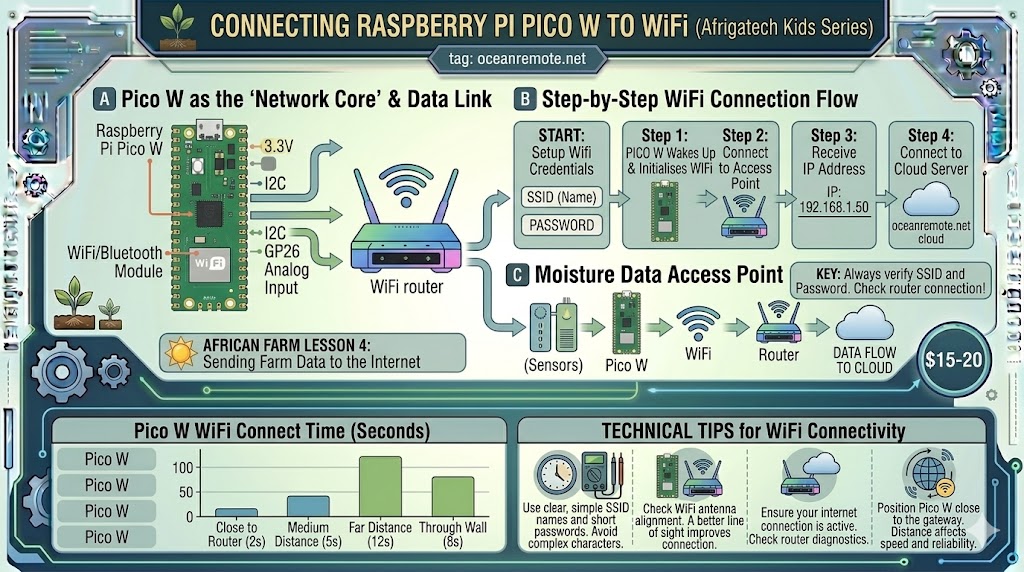
Connecting Pico W to WiFi
📶 Connecting Raspberry Pi Pico W to WiFi
📡 What You'll Learn:
- 🔌 Connect Pico W to WiFi network using MicroPython
- 📊 Understand WiFi status codes and error handling
- ⏱️ Set connection timeout to prevent infinite loops
- 🔐 Store credentials securely for your farm sensors
The Raspberry Pi Pico W has built-in WiFi (unlike the original Pico). This allows you to send sensor data to the cloud, control devices remotely, and build complete IoT farm monitoring systems.
📖 Basic WiFi Connection Code
import network
import time

# ========== WIFI CONFIGURATION ==========
ssid = "YOUR_WIFI_NAME"
password = "YOUR_WIFI_PASSWORD"

# ========== CONNECT TO WIFI ==========
wlan = network.WLAN(network.STA_IF)
wlan.active(True)
wlan.connect(ssid, password)

# ========== WAIT FOR CONNECTION (10 second timeout) ==========
print("📡 Connecting to WiFi", end="")
max_wait = 10

while max_wait > 0:
    if wlan.status() >= 3:  # STATUS_GOT_IP = 3
        break
    max_wait -= 1
    print(".", end="")
    time.sleep(1)

# ========== CHECK CONNECTION ==========
print()
if wlan.status() == 3:
    print('✅ Connected to WiFi!')
    print(f'📡 IP Address: {wlan.ifconfig()[0]}')
else:
    print('❌ WiFi connection failed')
    print(f'Status code: {wlan.status()}')
    print('- Status 0: No connection')
    print('- Status 1: Connecting')
    print('- Status 2: Wrong password')
    print('- Status 3: Connected (should be this)')
📊 WiFi Status Codes
| Status Code | Constant | Meaning | Action |
|---|---|---|---|
| 0 | STAT_IDLE | No connection, idle | Check WiFi is enabled |
| 1 | STAT_CONNECTING | Connecting in progress | Wait, normal state |
| 2 | STAT_WRONG_PASSWORD | Password incorrect | Check your password |
| 3 | STAT_GOT_IP | Connected successfully! | Ready to send data |
| -1 | STAT_NO_AP_FOUND | Network not found | Check SSID name |
| -2 | STAT_CONNECT_FAIL | Connection failed | Check signal strength |
💡 Best Practices for Farm Sensors:
- Connect only when needed: Don't keep WiFi on constantly - connect, send data, disconnect
- Use a timeout: Never wait forever for connection (10 seconds is plenty)
- Store credentials safely: Use a separate config file for SSID/password
- Handle reconnection: If connection fails, retry or go to sleep for next cycle
⚠️ Common WiFi Issues:
- Connection timeout: Check signal strength - move closer to router
- Wrong password: Verify case-sensitive password (WPA2/WPA3)
- 5GHz vs 2.4GHz: Pico W only supports 2.4GHz networks
- LED not blinking: WiFi module may be disabled - check wlan.active(True)
🎉 Key Takeaways:
- ✅ Use
network.STA_IFfor station mode (connecting to router) - ✅ Status code 3 = success (STAT_GOT_IP)
- ✅ Always set a connection timeout (10 seconds max)
- ✅ Pico W only supports 2.4GHz WiFi networks
- ✅ Disconnect WiFi when not sending data to save power
💡 Key Takeaways:
- Apply these concepts directly to your farm or project.
- Take notes on important details for the quiz.
- Use the button below to track your progress.
×
![Enlarged view]()