← Back to Course
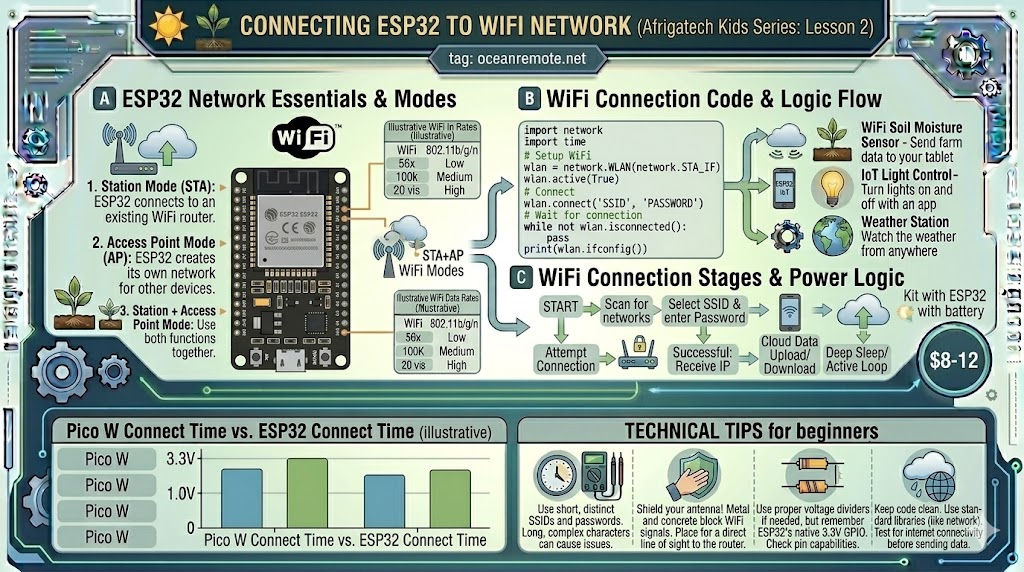
Connecting ESP32 to WiFi Network
📶 Connecting ESP32 to WiFi Network
📡 What You'll Learn:
- 🔌 Connect ESP32 to WiFi network in seconds
- 🔐 Add error handling and auto-reconnection
- 📊 Access sensor data from anywhere via cloud
- ⚠️ Avoid common WiFi connection issues
WiFi connectivity is what makes ESP32 an IoT device! Connect your soil moisture sensors, weather stations, and irrigation controllers to the internet and access data from anywhere in the world.
📖 Basic WiFi Connection Code
#include <WiFi.h>

const char* ssid = "YOUR_WIFI_NAME";
const char* password = "YOUR_WIFI_PASSWORD";

void setup() {
    Serial.begin(115200);
    delay(1000);

    Serial.println("\n📡 Connecting to WiFi...");
    WiFi.begin(ssid, password);

    // Wait up to 10 seconds for connection
    int attempts = 0;
    while (WiFi.status() != WL_CONNECTED && attempts < 20) {
        delay(500);
        Serial.print(".");
        attempts++;
    }

    Serial.println();

    if (WiFi.status() == WL_CONNECTED) {
        Serial.println("✅ WiFi connected!");
        Serial.print("📡 IP address: ");
        Serial.println(WiFi.localIP());
    } else {
        Serial.println("❌ WiFi connection failed!");
        Serial.println("   Check SSID, password, and signal strength");
    }
}

void loop() {
    // Your sensor reading code here
    delay(60000);
}
🔐 Secure WiFi with Auto-Reconnection
#include <WiFi.h>

const char* ssid = "YOUR_WIFI";
const char* password = "YOUR_PASSWORD";
unsigned long lastAttempt = 0;
bool wifiConnected = false;

void connectToWiFi() {
    Serial.print("📡 Connecting to WiFi");
    WiFi.begin(ssid, password);

    int attempts = 0;
    while (WiFi.status() != WL_CONNECTED && attempts < 20) {
        delay(500);
        Serial.print(".");
        attempts++;
    }

    Serial.println();

    if (WiFi.status() == WL_CONNECTED) {
        Serial.println("✅ WiFi connected!");
        Serial.print("📡 IP address: ");
        Serial.println(WiFi.localIP());
        wifiConnected = true;
    } else {
        Serial.println("❌ WiFi connection failed!");
        wifiConnected = false;
    }
}

void setup() {
    Serial.begin(115200);
    connectToWiFi();
}

void loop() {
    // Check connection status
    if (WiFi.status() != WL_CONNECTED) {
        Serial.println("⚠️ WiFi disconnected!");

        // Retry every 30 seconds
        if (millis() - lastAttempt > 30000) {
            Serial.println("🔄 Attempting to reconnect...");
            connectToWiFi();
            lastAttempt = millis();
        }
    } else {
        // WiFi is connected - do your work here
        // Read sensors, send data to cloud, etc.
    }

    delay(1000);
}
📊 WiFi Status Codes
| Status Code | Meaning | Action |
|---|---|---|
| WL_CONNECTED (3) | Connected successfully | Ready to send data |
| WL_NO_SSID_AVAIL (1) | Network not found | Check SSID name |
| WL_CONNECT_FAILED (4) | Wrong password | Verify password |
| WL_DISCONNECTED (6) | Disconnected | Auto-reconnect needed |
💡 Important Notes for African Farms:
- ESP32 supports 2.4GHz WiFi only (not 5GHz). Most rural WiFi uses 2.4GHz.
- Weak signal? Use external antenna version (ESP32-WROOM) for better range.
- Save power: Connect, send data, then disconnect with
WiFi.disconnect(true) - Static IP: Saves 1-2 seconds of connection time - use
WiFi.config()
⚠️ Common Issues & Solutions:
- Connection timeout: Move ESP32 closer to router or use external antenna
- Wrong password: Check case-sensitive characters (WiFi is case-sensitive)
- 5GHz network: ESP32 doesn't support it - change router to 2.4GHz
- Hidden SSID: Use
WiFi.begin(ssid, password, channel, bssid)
📖 Success Story - Remote Weather Station:
A farm in rural Tanzania installed an ESP32 weather station 500 meters from the main house:
- 📍 Challenge: Weak WiFi signal at sensor location
- 🔧 Solution: Used ESP32 with external antenna and WiFi repeater
- 📡 Result: Stable connection, data sent every 15 minutes
- 💰 Savings: No need for cellular data plan - free WiFi monitoring
🎉 Key Takeaways:
- ✅
WiFi.begin(ssid, password)→ Connect to network - ✅
WiFi.status() == WL_CONNECTED→ Check connection - ✅
WiFi.localIP()→ Get IP address - ✅ Always add timeout and auto-reconnect logic
- ✅ ESP32 = 2.4GHz WiFi only (not 5GHz)
💡 Key Takeaways:
- Apply these concepts directly to your farm or project.
- Take notes on important details for the quiz.
- Use the button below to track your progress.
×
![Enlarged view]()