DS18B20 Waterproof Temperature Sensor
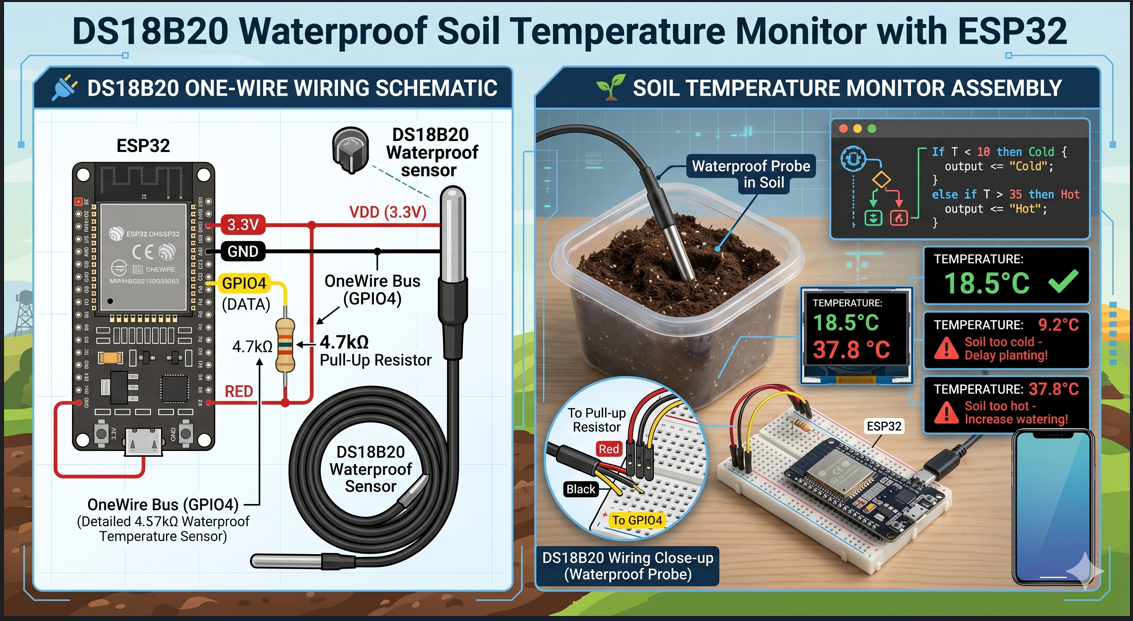
🌡️ DS18B20 Waterproof Temperature Sensor - Complete Guide
🔬 What You'll Learn in This Lesson:
- 🌡️ How to measure soil, water, and air temperature accurately
- 🔌 Wire the DS18B20 sensor correctly (OneWire protocol)
- 💻 Write complete Arduino/ESP32 code for temperature monitoring
- 📊 Send temperature data to OceanRemote cloud
- 🌾 Make farm decisions based on temperature readings
📋 Why Choose DS18B20?
| Feature | DS18B20 | DHT22 | NTC Thermistor |
|---|---|---|---|
| 🌡️ Temperature Range | -55°C to +125°C | -40°C to +80°C | -40°C to +125°C |
| 🎯 Accuracy | ±0.5°C | ±0.5°C | ±1-2°C |
| 💧 Waterproof | ✅ Yes (probe version) | ❌ No | ⚠️ Depends on model |
| 📏 Cable Length | Up to 100 meters | < 20 meters | < 10 meters |
| 🔌 Digital Interface | ✅ OneWire (single pin) | ✅ OneWire (single pin) | ❌ Analog (needs ADC) |
The waterproof probe version can be buried in soil, submerged in water tanks, or placed in compost piles. Perfect for monitoring soil temperature for seed germination, water temperature for aquaculture, or compost temperature for organic farming!
🔌 Complete Wiring Diagram
DS18B20 Waterproof Probe Connections:
┌─────────────────────────────────────────────────────────────────┐
│                                                                 │
│   DS18B20 Probe          ESP32/ESP8266                         │
│   ═════════════          ════════════                         │
│                                                                 │
│   Red Wire (VDD)    ───► 3.3V                                  │
│   Black Wire (GND)  ───► GND                                   │
│   Yellow Wire (DATA) ───► GPIO4                                │
│                                                                 │
│   IMPORTANT: Add a 4.7kΩ resistor between DATA and 3.3V!       │
│                                                                 │
│   ┌─────┐                                                      │
│   │     │                                                      │
│   │ 4.7k│                                                      │
│   │     │                                                      │
│   └──┬──┘                                                      │
│      │                                                         │
│   3.3V┼──────────────────────┬─────────────► Red Wire (VDD)    │
│      │                       │                                │
│      ├───────────────────────┼─────────────► Yellow (DATA)     │
│      │                       │              with 4.7k pull-up  │
│      │                                                         │
│    GND┼───────────────────────────────────► Black Wire (GND)   │
│                                                                 │
└─────────────────────────────────────────────────────────────────┘

Alternative: Many DS18B20 modules include the resistor already!
The 4.7kΩ pull-up resistor between DATA and 3.3V is MANDATORY. Without it, you will get "CRC error" or "Device not found". If your module doesn't have one built-in, add it yourself!
📚 Required Libraries
Install these libraries in Arduino IDE:
1. OneWire by Jim Studt
2. DallasTemperature by Miles Burton

Install via: Sketch → Include Library → Manage Libraries → Search and Install
💻 Basic Arduino Code (Single Sensor)
/* * DS18B20 Waterproof Temperature Sensor - Basic Reading * Perfect for soil, water, or air temperature monitoring * * Components: * - 1x DS18B20 waterproof probe * - 1x 4.7kΩ resistor (if not on module) * - ESP32/ESP8266 board */ #include#include // GPIO pin connected to DS18B20 DATA wire #define ONE_WIRE_BUS 4 // Setup OneWire and DallasTemperature OneWire oneWire(ONE_WIRE_BUS); DallasTemperature sensors(&oneWire); void setup() { Serial.begin(115200); Serial.println("========================================"); Serial.println("🌡️ DS18B20 Temperature Monitor v1.0"); Serial.println(" Waterproof Soil/Water Temperature"); Serial.println("========================================"); // Initialize the sensor sensors.begin(); // Check if sensor is connected int deviceCount = sensors.getDeviceCount(); if (deviceCount == 0) { Serial.println("❌ ERROR: No DS18B20 sensor found!"); Serial.println(" Check wiring and pull-up resistor!"); } else { Serial.printf("✅ Found %d DS18B20 sensor(s)\n", deviceCount); } } void loop() { // Request temperature from all sensors sensors.requestTemperatures(); // Read temperature in Celsius float tempC = sensors.getTempCByIndex(0); // Check for valid reading if (tempC == -127.00) { Serial.println("❌ Sensor read error! Check connection."); } else { // Convert to Fahrenheit (optional) float tempF = tempC * 9.0 / 5.0 + 32.0; Serial.println("━━━━━━━━━━━━━━━━━━━━━━━━━━━━━━━━━━"); Serial.printf("🌡️ Temperature: %.1f°C | %.1f°F\n", tempC, tempF); // Agricultural recommendations based on temperature if (tempC < 10) { Serial.println("⚠️ SOIL TOO COLD! Delay planting seeds."); } else if (tempC >= 10 && tempC < 18) { Serial.println("🌱 Cool season crops only (lettuce, spinach, peas)"); } else if (tempC >= 18 && tempC < 25) { Serial.println("✅ IDEAL temperature for most vegetables!"); } else if (tempC >= 25 && tempC < 35) { Serial.println("🌞 Warm season crops thrive (tomatoes, peppers, corn)"); } else if (tempC >= 35) { Serial.println("⚠️ SOIL TOO HOT! Increase mulching and watering."); } Serial.println("━━━━━━━━━━━━━━━━━━━━━━━━━━━━━━━━━━"); } delay(5000); // Read every 5 seconds }
💧 Multiple Sensors on One Wire (Advanced)
/* * Multiple DS18B20 Sensors - Monitor different zones! * You can connect up to 100 sensors on the same wire! * Perfect for: different soil depths, multiple garden beds, compost piles */ #include#include #define ONE_WIRE_BUS 4 OneWire oneWire(ONE_WIRE_BUS); DallasTemperature sensors(&oneWire); // Store sensor addresses DeviceAddress sensor1, sensor2, sensor3; int sensorCount = 0; void setup() { Serial.begin(115200); sensors.begin(); Serial.println("========================================"); Serial.println("🌾 Multi-Zone Temperature Monitor"); Serial.println("========================================"); // Discover all sensors sensorCount = sensors.getDeviceCount(); Serial.printf("📍 Found %d DS18B20 sensor(s)\n", sensorCount); // Get addresses of first 3 sensors if (sensorCount >= 1) sensors.getAddress(sensor1, 0); if (sensorCount >= 2) sensors.getAddress(sensor2, 1); if (sensorCount >= 3) sensors.getAddress(sensor3, 2); } void printTemperature(DeviceAddress deviceAddress, String location) { float tempC = sensors.getTempC(deviceAddress); if (tempC != -127.00) { Serial.printf("%s: %.1f°C | %.1f°F\n", location.c_str(), tempC, tempC * 9.0/5.0 + 32.0); } else { Serial.printf("%s: 🔴 ERROR - No sensor detected!\n", location.c_str()); } } void loop() { sensors.requestTemperatures(); Serial.println("\n━━━━━━━━━━━━━━━━━━━━━━━━━━━━━━━━━━"); Serial.println("📊 ZONE TEMPERATURES:"); if (sensorCount >= 1) printTemperature(sensor1, " 🌱 Garden Bed A"); if (sensorCount >= 2) printTemperature(sensor2, " 💧 Water Tank"); if (sensorCount >= 3) printTemperature(sensor3, " 🪴 Compost Pile"); Serial.println("━━━━━━━━━━━━━━━━━━━━━━━━━━━━━━━━━━\n"); delay(30000); // Read every 30 seconds }
☁️ Send Data to OceanRemote Cloud
/* * DS18B20 with OceanRemote Cloud Integration * Monitor soil temperature from anywhere in the world! */ #include#include #include #include #define ONE_WIRE_BUS 4 // WiFi Configuration const char* ssid = "YOUR_WIFI"; const char* password = "YOUR_PASSWORD"; // OceanRemote Configuration const char* token = "YOUR_DEVICE_TOKEN"; OneWire oneWire(ONE_WIRE_BUS); DallasTemperature sensors(&oneWire); void setup() { Serial.begin(115200); sensors.begin(); // Connect to WiFi WiFi.begin(ssid, password); while (WiFi.status() != WL_CONNECTED) { delay(500); Serial.print("."); } Serial.println("\n✅ WiFi connected!"); Serial.println("🌡️ DS18B20 Cloud Monitor Ready"); } void sendToCloud(float temperature) { if (WiFi.status() == WL_CONNECTED) { HTTPClient http; http.begin("https://api.oceanremote.net/device/state"); http.addHeader("Content-Type", "application/x-www-form-urlencoded"); String data = "token=" + String(token); data += "&temperature=" + String(temperature); data += "&sensor=ds18b20"; int httpCode = http.POST(data); if (httpCode > 0) { Serial.println("✅ Data sent to OceanRemote"); } http.end(); } } void loop() { sensors.requestTemperatures(); float tempC = sensors.getTempCByIndex(0); if (tempC != -127.00) { Serial.printf("🌡️ Soil Temperature: %.1f°C\n", tempC); sendToCloud(tempC); } else { Serial.println("❌ Sensor error!"); } delay(60000); // Send every minute }
A vegetable farm in Kenya installed DS18B20 sensors at 10cm, 20cm, and 30cm depths:
- 🌡️ Problem: Seeds failing to germinate in certain areas
- 🔬 Solution: Buried 3 DS18B20 sensors at different depths
- 📊 Discovery: Top 10cm was 12°C (too cold), 30cm was 22°C (ideal)
- ✅ Action: Planted deeper seeds and added black plastic mulch
- 📈 Result: 85% germination rate increased from 40%
"The DS18B20 sensors showed us exactly where to plant for better germination!" - Farmer, Kenya
🔧 Troubleshooting Common Issues
| Problem | Solution |
|---|---|
| ❌ "Device not found" | Check 4.7kΩ pull-up resistor between DATA and 3.3V |
| ❌ Reading -127°C | Bad connection - check yellow DATA wire |
| ❌ "CRC error" | Cable too long (max 100m) or electrical interference |
| ❌ Temperature jumps around | Add a 100µF capacitor between VDD and GND near sensor |
You now know how to:
- ✅ Wire DS18B20 sensors correctly with pull-up resistor
- ✅ Read temperature from single or multiple sensors
- ✅ Send data to OceanRemote cloud
- ✅ Make farm decisions based on soil temperature
Next step: Add a soil moisture sensor to create a complete automated irrigation system!
sensors.begin();                    // Initialize sensor
sensors.requestTemperatures();      // Request temperature reading
float temp = sensors.getTempCByIndex(0);  // Read first sensor
float temp = sensors.getTempC(deviceAddress); // Read specific sensor
int count = sensors.getDeviceCount();  // Get number of sensors
- Apply these concepts directly to your farm or project.
- Take notes on important details for the quiz.
- Use the button below to track your progress.