← Back to Course
Complete Soil Monitoring Code
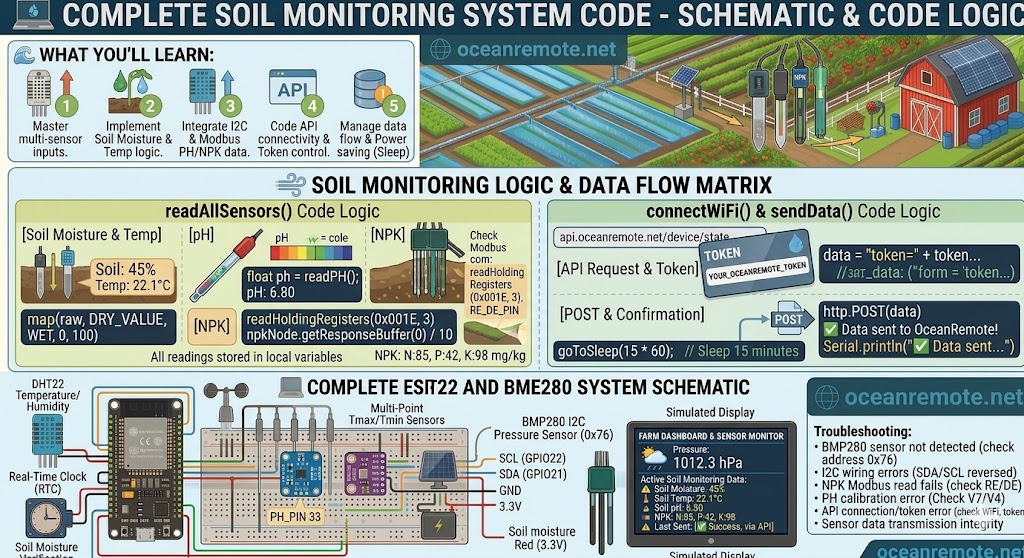
💻 Complete Soil Monitoring System Code - Moisture, Temp, pH & NPK
💻 What You'll Learn:
- 🌱 Read soil moisture, temperature, pH, and NPK from one ESP32
- 📊 Send all data to OceanRemote cloud dashboard
- 🔋 Use deep sleep for battery/solar operation
- 💰 $30-50 sensor package for complete soil health
📋 Sensor Pin Mapping
- Soil Moisture (Capacitive): GPIO32 (Analog)
- pH Sensor: GPIO33 (Analog)
- DS18B20 (Soil Temp): GPIO4 (OneWire)
- NPK Sensor (RS485): GPIO16(RX), GPIO17(TX), GPIO5(RE/DE)
📖 Complete Soil Monitoring Code
// Complete Soil Monitoring - Moisture, Temp, pH, NPK
#include <WiFi.h>
#include <OneWire.h>
#include <DallasTemperature.h>
#include <ModbusMaster.h>

// WiFi
const char* ssid = "YOUR_WIFI";
const char* password = "YOUR_PASSWORD";
const char* token = "YOUR_TOKEN";

// Pins
#define SOIL_PIN 32
#define PH_PIN 33
#define ONE_WIRE 4
#define RE_DE 5

// Calibration (calibrate your sensors!)
const int DRY = 3800, WET = 1500;     // Soil moisture
const float PH7_VOLT = 2.5;           // pH 7.0 voltage
const float PH4_VOLT = 3.0;           // pH 4.0 voltage

OneWire ow(ONE_WIRE);
DallasTemperature ds18b20(&ow);
ModbusMaster npk;

void setup() {
    Serial.begin(115200);

    // Init sensors
    ds18b20.begin();
    Serial2.begin(4800, SERIAL_8N1, 16, 17);
    pinMode(RE_DE, OUTPUT);
    digitalWrite(RE_DE, HIGH);
    npk.begin(1, Serial2);

    readAll();
    connectWiFi();
    sendToCloud();

    // Deep sleep 15 min
    esp_sleep_enable_timer_wakeup(15 * 60 * 1000000ULL);
    esp_deep_sleep_start();
}

float readMoisture() {
    int raw = analogRead(SOIL_PIN);
    int m = map(raw, DRY, WET, 0, 100);
    return constrain(m, 0, 100);
}

float readSoilTemp() {
    ds18b20.requestTemperatures();
    return ds18b20.getTempCByIndex(0);
}

float readPH() {
    int raw = analogRead(PH_PIN);
    float volt = raw * (3.3 / 4095.0);
    // Linear interpolation: pH = 7 + (PH7_VOLT - volt) * (7 / (PH7_VOLT - PH4_VOLT))
    return 7 + (PH7_VOLT - volt) * (7 / (PH7_VOLT - PH4_VOLT));
}

void readNPK(int &n, int &p, int &k) {
    uint8_t res = npk.readHoldingRegisters(0x001E, 3);
    if (res == npk.ku8MBSuccess) {
        n = npk.getResponseBuffer(0) / 10;
        p = npk.getResponseBuffer(1) / 10;
        k = npk.getResponseBuffer(2) / 10;
    } else {
        n = p = k = 0;
    }
}

void connectWiFi() {
    WiFi.begin(ssid, password);
    int attempts = 0;
    while (WiFi.status() != WL_CONNECTED && attempts < 20) {
        delay(500);
        attempts++;
    }
}

void sendToCloud() {
    if (WiFi.status() != WL_CONNECTED) return;

    float m = readMoisture();
    float t = readSoilTemp();
    float ph = readPH();
    int n, p, k;
    readNPK(n, p, k);

    HTTPClient http;
    http.begin("https://api.oceanremote.net/device/state");
    http.addHeader("Content-Type", "application/x-www-form-urlencoded");

    String data = "token=" + String(token);
    data += "&moisture=" + String(m);
    data += "&soil_temp=" + String(t);
    data += "&ph=" + String(ph);
    data += "&nitrogen=" + String(n);
    data += "&phosphorus=" + String(p);
    data += "&potassium=" + String(k);

    http.POST(data);
    http.end();

    // Print report
    Serial.println("\n🌱 SOIL REPORT:");
    Serial.printf("   Moisture: %.0f%%\n", m);
    Serial.printf("   Temp: %.1f°C\n", t);
    Serial.printf("   pH: %.1f\n", ph);
    Serial.printf("   NPK: %d | %d | %d mg/kg\n", n, p, k);

    if (m < 30) Serial.println("   ⚠️ DRY - Water needed");
    if (ph < 5.5) Serial.println("   ⚠️ ACIDIC - Add lime");
    if (ph > 7.5) Serial.println("   ⚠️ ALKALINE - Add sulfur");
}

void loop() {}  // Everything runs in setup() due to deep sleep
💡 Sensor Cost Breakdown:
- 🌱 Capacitive moisture: $8-12
- 🌡️ DS18B20 waterproof: $5
- 🧪 pH sensor (SEN0161): $12-15
- 📊 NPK sensor (JXCT RS485): $50-70
- 🖥️ ESP32: $6-10
- Total: $80-115 for complete soil lab!
⚠️ Important Calibration Notes:
- pH sensors need calibration with pH 4.0 and 7.0 buffer solutions
- NPK sensors require 24V power supply (not 5V from ESP32!)
- DS18B20 needs 4.7kΩ pull-up between DATA and 3.3V
- Calibrate moisture sensor in dry air and water
🎯 Quick Reference:
- 🌱 Moisture: <30% = dry, >70% = wet
- 🌡️ Soil temp: Ideal 18-25°C for most crops
- 🧪 pH: 6.0-7.0 optimal for vegetables
- 📊 NPK targets: N (150-250), P (30-60), K (150-300) mg/kg
💡 Key Takeaways:
- Apply these concepts directly to your farm or project.
- Take notes on important details for the quiz.
- Use the button below to track your progress.
×
![Enlarged view]()