← Back to Course
Integrating Multiple Sensors
🔄 Building a Complete Weather Station - Integrating Multiple Sensors
🌦️ What You'll Learn:
- 🔌 Connect temperature, humidity, rain, and pressure sensors to one ESP32
- 📊 Read multiple sensors simultaneously without interference
- 🌡️ Predict weather using barometric pressure trends
- 📡 Send all data to OceanRemote cloud dashboard
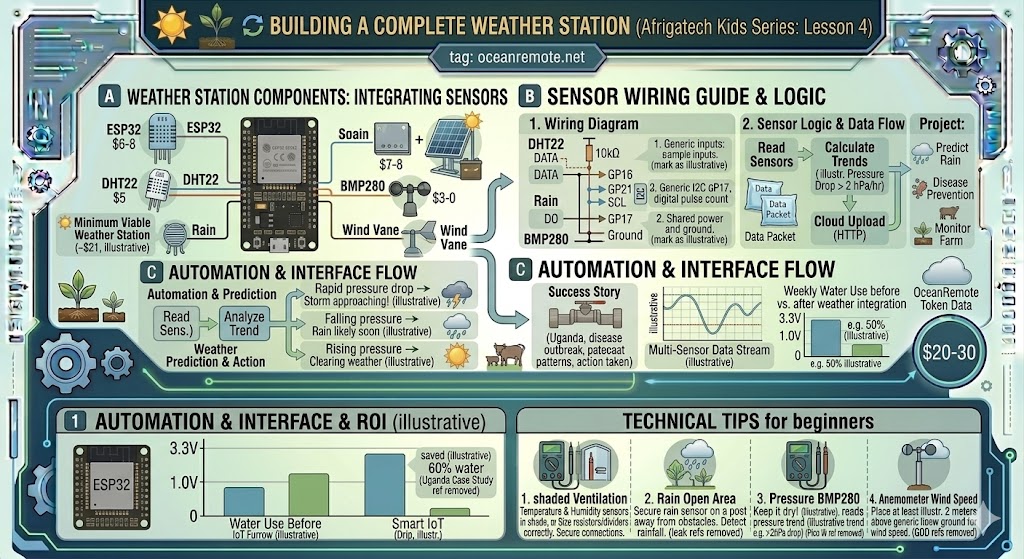
A complete weather station gives you the full picture of your farm's microclimate. By combining multiple sensors, you can track temperature, humidity, rainfall, wind, and barometric pressure - all from one ESP32.
🛠️ Complete Weather Station Components
- ESP32 board ($6-8): The brain of your weather station
- DHT22 ($5): Temperature and humidity (better than DHT11)
- Rain sensor ($3): Detects rainfall (LOW = raining)
- BMP280 ($5): Barometric pressure for weather prediction (optional)
- Anemometer ($15): Wind speed measurement (optional)
- Wind vane ($10): Wind direction (optional)
- Solar panel + battery ($15): For remote/off-grid operation
💡 Minimum Viable Weather Station ($20):
For budget-conscious farmers, start with ESP32 ($8) + DHT22 ($5) + Rain sensor ($3) + BMP280 ($5) = $21. This gives you temperature, humidity, rainfall detection, and pressure-based weather forecasting.
🔗 Wiring Multiple Sensors
- DHT22 DATA → GPIO15 (with 10kΩ pull-up to 3.3V)
- Rain Sensor DO → GPIO16 (digital output, LOW = rain)
- BMP280 SDA → GPIO21 (I2C data line)
- BMP280 SCL → GPIO22 (I2C clock line)
- Anemometer → GPIO17 (digital pulse counter)
- All sensors share VCC (3.3V) and GND
⚠️ Important Notes on I2C Sensors (BMP280):
- All I2C sensors share the same SDA/SCL pins (GPIO21, GPIO22)
- Each I2C sensor needs a unique address (check with I2C scanner)
- Total cable length for I2C should be under 1-2 meters
📖 Complete Weather Station Code
#include <WiFi.h>
#include <DHT.h>
#include <Wire.h>
#include <Adafruit_BMP280.h>
#include <HTTPClient.h>

// ========== WIFI CONFIGURATION ==========
const char* ssid = "YOUR_WIFI";
const char* password = "YOUR_PASSWORD";
const char* token = "YOUR_OCEANREMOTE_TOKEN";

// ========== PIN DEFINITIONS ==========
#define DHTPIN 15
#define DHTTYPE DHT22
#define RAINPIN 16
#define WINDSPEED_PIN 17

DHT dht(DHTPIN, DHTTYPE);
Adafruit_BMP280 bmp;

volatile int windPulses = 0;
float windSpeed = 0;
unsigned long lastWindCalc = 0;

void IRAM_ATTR windISR() {
    windPulses++;
}

void setup() {
    Serial.begin(115200);
    dht.begin();
    Wire.begin();
    bmp.begin(0x76);
    pinMode(RAINPIN, INPUT_PULLUP);

    pinMode(WINDSPEED_PIN, INPUT_PULLUP);
    attachInterrupt(digitalPinToInterrupt(WINDSPEED_PIN), windISR, FALLING);

    WiFi.begin(ssid, password);
    while (WiFi.status() != WL_CONNECTED) delay(500);
    Serial.println("✅ WiFi connected!");
}

float calculatePressureTrend(float current, float previous) {
    return current - previous;
}

void sendToCloud(float temp, float hum, float pressure, bool raining, float wind) {
    if (WiFi.status() != WL_CONNECTED) return;

    HTTPClient http;
    http.begin("https://api.oceanremote.net/device/state");
    http.addHeader("Content-Type", "application/x-www-form-urlencoded");

    String data = "token=" + String(token);
    data += "&temperature=" + String(temp);
    data += "&humidity=" + String(hum);
    data += "&pressure=" + String(pressure);
    data += "&raining=" + String(raining ? "YES" : "NO");
    data += "&wind_speed=" + String(wind);

    http.POST(data);
    http.end();
}

void loop() {
    // Calculate wind speed
    if (millis() - lastWindCalc >= 1000) {
        windSpeed = windPulses * 0.34;  // 0.34 km/h per pulse
        windPulses = 0;
        lastWindCalc = millis();
    }

    // Read sensors
    float temp = dht.readTemperature();
    float hum = dht.readHumidity();
    float pressure = bmp.readPressure() / 100.0F;
    bool raining = (digitalRead(RAINPIN) == LOW);

    static float lastPressure = pressure;
    float pressureTrend = calculatePressureTrend(pressure, lastPressure);
    lastPressure = pressure;

    // Display data
    Serial.println("━━━━━━━━━━━━━━━━━━━━━━━━━━━━━━━━━━");
    Serial.printf("🌡️ Temperature: %.1f°C\n", temp);
    Serial.printf("💧 Humidity: %.1f%%\n", hum);
    Serial.printf("📊 Pressure: %.1f hPa\n", pressure);
    Serial.printf("📈 Pressure trend: %.1f hPa/hour\n", pressureTrend);
    Serial.printf("☔ Raining: %s\n", raining ? "YES" : "NO");
    Serial.printf("💨 Wind speed: %.1f km/h\n", windSpeed);

    // Weather prediction based on pressure trend
    if (pressureTrend < -2.0) {
        Serial.println("⚠️ Rapid pressure drop - Storm approaching!");
    } else if (pressureTrend < -0.5) {
        Serial.println("🌧️ Pressure falling - Rain likely soon");
    } else if (pressureTrend > 2.0) {
        Serial.println("☀️ Pressure rising - Clearing weather");
    }
    Serial.println("━━━━━━━━━━━━━━━━━━━━━━━━━━━━━━━━━━\n");

    sendToCloud(temp, hum, pressure, raining, windSpeed);

    delay(60000);  // Read every minute
}
📖 Success Story - Uganda Coffee Farm:
A coffee farm installed a complete weather station to monitor microclimate conditions:
- 🌡️ Problem: Coffee berry disease outbreaks were unpredictable
- 🔧 Solution: Weather station tracked humidity and rainfall patterns
- 📊 Discovery: Disease outbreaks always followed 3+ days of >85% humidity
- ✅ Action: Farmers now apply fungicide BEFORE humidity periods
- 📈 Result: 60% reduction in disease, 35% yield increase
"The weather station paid for itself in one season. Now we predict problems before they happen." - Coffee Cooperative, Uganda
💡 Sensor Placement Tips:
- Temperature/Humidity: Mount in shaded, ventilated enclosure (never direct sun)
- Rain sensor: Open area away from trees and buildings
- Pressure sensor: Anywhere dry (pressure is same everywhere locally)
- Anemometer: At least 2 meters above ground, away from obstacles
- All sensors: Keep electronics in waterproof IP65 enclosure
🎯 Key Takeaways:
- ✅ DHT22 + Rain sensor + BMP280 = complete weather station for $20-30
- ✅ I2C sensors (BMP280) share SDA/SCL pins - easy to add multiple sensors
- ✅ Barometric pressure trend predicts rain 12-24 hours in advance
- ✅ Falling pressure > 2 hPa/hour = storm approaching!
- ✅ Send all data to OceanRemote for cloud monitoring and alerts
Next step: Add solar power for remote/off-grid operation!
💡 Key Takeaways:
- Apply these concepts directly to your farm or project.
- Take notes on important details for the quiz.
- Use the button below to track your progress.
×
![Enlarged view]()